
Prove a backlink is live by opening the publisher page, inspecting the actual link, and saving dated evidence of its destination and attributes. Prove the referring page is indexed with Google Search Console’s URL Inspection report when the publisher provides access or evidence; without that, report public search evidence separately and never claim that Google has credited the individual backlink.
- How to prove a backlink is live and indexed: document the link separately from Google’s referring-page indexing evidence.
- Google Search Console URL Inspection provides publisher-side indexing evidence; its live test checks current accessibility, not index inclusion.
- A Google search result supports referring-page inclusion; an absent result does not establish that the page is unindexed.
- Backlink checker discovery proves discovery by that provider, not Google indexing or ranking value.
Why this matters
Your client needs evidence, not a green status badge. A published article, a working backlink, an indexed referring page, and a ranking improvement are different claims requiring different checks.
For your 2026 reporting, separate delivery verification from search performance. The guide to connecting Google Search Console to a niche edit campaign covers the campaign context, but the critical access boundary remains: your client’s property does not give you URL Inspection access to an unrelated publisher’s page.
How do you prove a backlink is live and indexed to a client?
Send a dated evidence pack that separates link presence, referring-page indexing, and anything still unverified. Use the checks below rather than treating a backlink checker export as complete proof.
1. Open the exact referring page
Load the publisher URL in a browser without using an authenticated publisher session. Confirm that the article is publicly accessible and that the expected text appears.
Check the final HTTP response and record any redirects. An HTTP 200 response supports successful delivery, but inspect the content too: an error message can appear on a page that returns 200.
An HTTP 301 response means you must follow the redirect and verify the final article. An HTTP 404 response means the requested page was not found; it is not evidence of a live placement.
2. Inspect the backlink itself
Find the anchor text in the article and inspect its HTML element with browser developer tools. Record the actual href, not just the address displayed in a screenshot or the text a reader sees.
Confirm that the link points to the agreed destination. If it redirects, record the final destination and check whether the client approved that landing page.
Capture relevant rel attributes, including nofollow, sponsored, and ugc. Do not label a link as followed merely because its anchor looks normal; appearance does not reveal these attributes.
3. Check indexing eligibility separately
Inspect the referring page’s robots directives, HTTP headers, and canonical declaration where accessible. Record any noindex directive or canonical pointing elsewhere, and check crawl restrictions separately.
These checks explain potential obstacles. An indexable page is not necessarily an indexed page.
Google Search Central’s indexing guidance distinguishes crawl access from indexing directives. In particular, a robots.txt block can prevent Google from seeing a page’s noindex directive; robots.txt is not a reliable removal instruction.
4. Get publisher-side indexing evidence
Ask the publisher to inspect the exact referring URL in the correct Search Console property. Request a capture showing the inspected URL, the indexed-status result, and the available crawl and canonical details.
Use the report about Google’s indexed version, not just the live test. Google Search Central’s URL Inspection documentation distinguishes these views: the live test assesses the current page and does not confirm that it is indexed.
Keep the evidence date attached. Search Console evidence is a status observation, not a promise that the page will remain indexed indefinitely.
5. Label public search checks accurately
Without publisher cooperation, search Google for the exact referring URL and distinctive article text. If the exact page appears, save the result and record when you observed it.
A site: search can help locate the page, but Google does not guarantee exhaustive results for that operator. If nothing appears, label the outcome indexing unverified, not automatically not indexed.
Also confirm that the returned result is the actual referring page. A syndicated copy, category page, or different canonical URL does not establish inclusion of the URL you promised the client.
6. Package the evidence for the client
Put the referring URL, destination, anchor, attributes, check date, and indexing evidence together in the delivery record. Attach a screenshot of the link in context and a technical capture showing its destination.
Keep the live-link check date separate from the indexing observation date. For a 2026 report, use full dates and a timezone for timestamps so the client can distinguish an earlier publisher capture from your latest inspection.
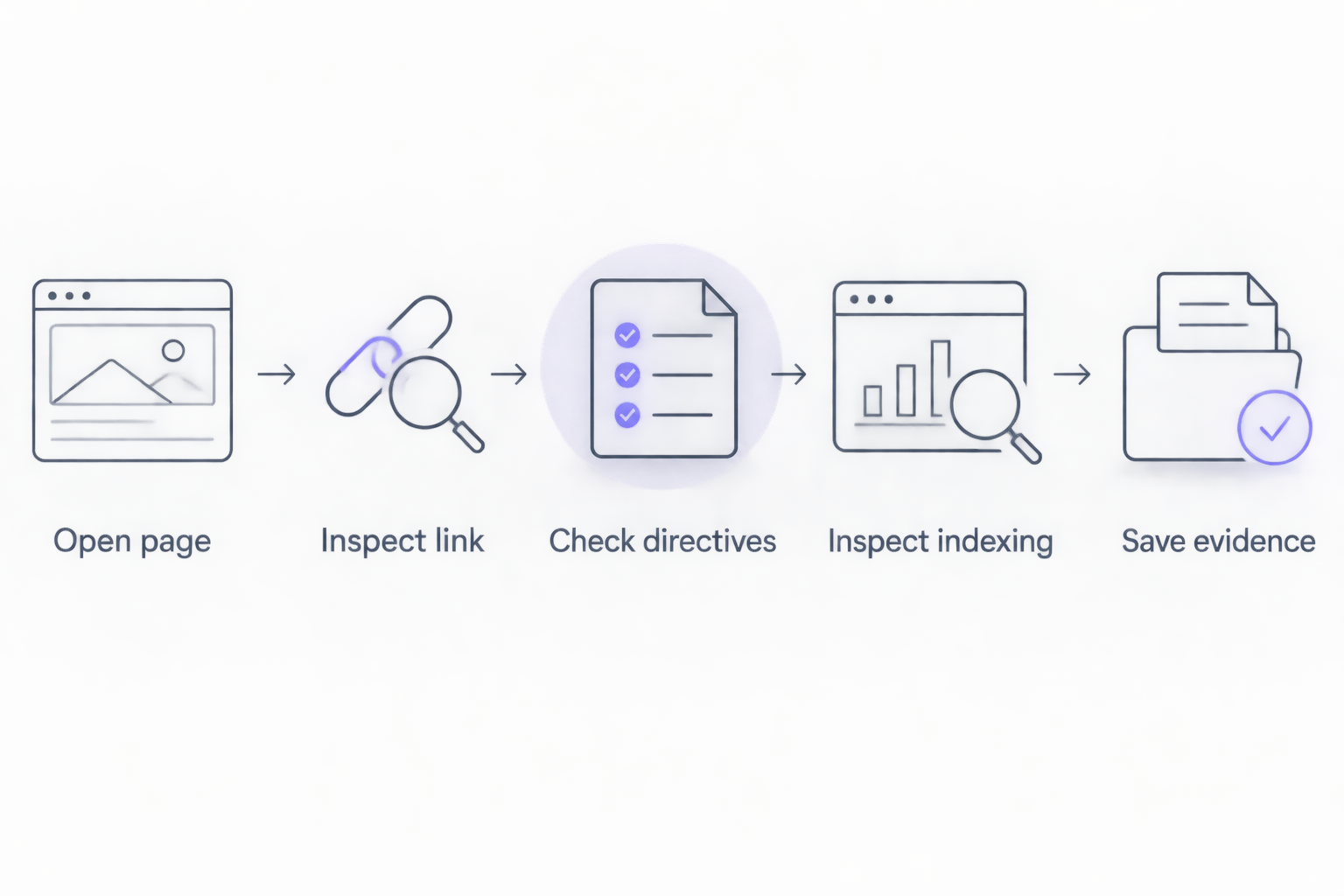
A useful evidence pack follows this sequence: Open page, Inspect link, Check directives, Inspect indexing, Save evidence. Each step answers a different question.
Which verification method should you use?
No single check proves everything. Choose the method that matches the claim, and include its limitation beside the result.
| Method | Best for | What it establishes | Limitation |
|---|---|---|---|
| Browser and HTML inspection | Current link verification | Link presence, destination, context, and attributes | Does not establish Google indexing |
| HTTP and directive checks | Technical diagnosis | Response status and observable indexing obstacles | Eligibility does not establish inclusion |
| Publisher Search Console URL Inspection | Referring-page indexing evidence | Google’s reported indexed status for the inspected URL | Requires publisher access or cooperation; does not prove link credit |
| Google search result | Public corroboration | The exact referring page appeared in the observed results | Missing results do not conclusively establish exclusion |
| Third-party backlink checker | Independent discovery and monitoring | That provider discovered a link | Does not establish Google discovery, indexing, or ranking value |
For your 2026 delivery standard, use browser inspection for the live-link claim and publisher-side Search Console evidence for the indexing claim whenever obtainable. Use public search and backlink databases as supporting evidence, not interchangeable substitutes.
If a publisher supplies only a cropped green badge, request the inspected URL and report context. A status without an identifiable page cannot substantiate that placement.
What should your client-facing proof record contain?
Use a consistent evidence record rather than a paragraph saying the placement is complete. The following fields are a reporting template, not sample findings.
| Field | What to record |
|---|---|
| Referring URL | Exact publisher article inspected |
| Final referring URL | Destination after any publisher-side redirects |
| Client destination | Actual link target and final landing page |
| Anchor and context | Visible anchor plus surrounding passage |
| Link attributes | Observed rel values, or their absence |
| Page response | Final HTTP status and visible page condition |
| Indexing evidence | Publisher URL Inspection result or public search observation |
| Observation dates | Separate dates for link inspection and indexing evidence |
| Evidence files | Screenshots, technical captures, and publisher correspondence |
| Next action | Correction request, evidence request, or scheduled recheck |
Keep the conclusion narrow. “Link verified live; referring-page indexing unverified” is a complete, useful result when that is what the evidence supports.
Do not insert a fabricated example capture into a client report. For a reusable 2026 template, leave observation fields blank until someone completes the actual check.
Why backlink verification results vary
Different observations do not always mean someone made a mistake. Check these factors before marking a placement failed or complete:
- Access differences: Your browser, a backlink crawler, and Google can encounter different access restrictions. Record the environment behind each observation.
- Observation timing: An older indexed snapshot and the current live article can contain different content. Keep their timestamps separate.
- Canonical selection: Google can select a different canonical URL. Record the indexed URL rather than assuming every duplicate is indexed independently.
- Page directives: A
noindexdirective, crawl restriction, or changed response can affect what Google can process. Diagnose each separately. - Link changes: The anchor, destination, attributes, or entire link can change after publication. An old screenshot does not prove current placement.
- Discovery coverage: Third-party databases and public search checks answer different questions. Their results are not substitutes for publisher-side URL Inspection.
For niche edits, an indexed article does not prove Google has crawled the newly inserted link. Compare the available crawl timing with the documented edit timing before describing the evidence to your client.
What if the publisher page is indexed but the backlink is new?
An indexed referring page establishes page inclusion, not processing of every later edit. Verify the new link live, document its insertion timing, and request updated publisher-side crawl evidence where available.
Even a crawl after insertion does not expose whether Google gives that individual link ranking credit. Report the observed facts without turning a crawl timestamp into an authority-transfer claim.
Can the client’s Search Console prove an external page is indexed?
The client’s Search Console property cannot provide URL Inspection results for an unrelated publisher URL outside its verified scope. Ask the publisher for that evidence instead.
The client’s Links report is a separate source of information and is not an exhaustive backlink inventory. Presence there does not replace inspection of the referring page’s current content or indexed status.
Does an indexed backlink prove SEO results?
An indexed referring page does not prove ranking value, referral traffic, or revenue. Track those outcomes separately from placement delivery.
For a 2026 campaign report, distinguish delivery verified, indexing evidenced, and performance measured. A ranking change after publication does not, by itself, establish that one backlink caused it.
Where a link building platform fits
NO-BS Marketplace is a link building platform best suited to SEO professionals and agencies seeking publisher placements. It connects those buyers with verified publisher sites for content, backlinks, sponsored content, and digital PR placements.
NO-BS Marketplace’s link building role does not replace the evidence checks above. Publisher verification and verification of a specific live link are different tasks; neither establishes Google’s treatment of that individual backlink.
Apply the same acceptance standard to marketplace placements, direct outreach, and white-label work. For paid placements, Google recommends rel="sponsored", with nofollow also acceptable; do not ask a publisher to remove appropriate qualification just to make the report look better.
FAQ
What’s the best way to prove a backlink is live?
Inspect the exact publisher page and the link’s HTML, then save dated evidence of the anchor, destination, and attributes. A screenshot shows context but does not reveal the actual href or rel values by itself.
How do I prove a referring page is indexed by Google?
Request the publisher’s Search Console URL Inspection result for the exact referring URL. Use the indexed-version report, not just the live test, and retain the observation date.
Does a site search prove that a backlink is not indexed?
No, an absent site-search result does not conclusively establish that the referring page is unindexed. Record indexing as unverified unless you have stronger evidence.
Can a backlink checker confirm Google indexing?
No, a backlink checker confirms discovery by that provider, not Google indexing. Use its findings for discovery and monitoring while keeping Google indexing evidence separate.
Is a screenshot enough proof for a client?
A screenshot alone is not enough to prove both a live backlink and referring-page indexing. Pair visual context with link inspection and a separately identified indexing source.
Can an indexed article contain a backlink Google has not recrawled?
Yes, a publisher can add a backlink after Google’s recorded crawl of an indexed article. Document the edit timing and do not claim that existing page inclusion proves processing of the new link.
What evidence should I request for a NO-BS Marketplace placement?
Request the exact referring URL and retain dated checks of the live link, destination, anchor, and attributes. Request publisher-side indexing evidence separately; the placement source alone does not establish Google indexing.
One last thing
Preserve changes, not just the latest status. If a publisher removes a link and later restores it, overwriting the delivery record hides the interruption.
Keep the original proof, the failure observation, and the restoration check together. Whether you use NO-BS Marketplace or direct outreach, that history gives your client a clearer answer than a permanent green badge.