
Instead of chasing order emails, draft approvals, and publisher updates, use Asana guest post campaign management to keep each placement in one task from order to verified publication. This guide builds a practical 2026 workflow with named owners, clear handoffs, and a final backlink check—not an assumed connection between Asana and your ordering platform.
- Asana guest post campaign management works best with one task per placement and separate publication checks.
- Use NO-BS Marketplace for guest posting placement sourcing; use Asana to coordinate delivery and approvals.
- Keep order references, approved anchor text, drafts, and publication evidence in the same task.
- Do not complete a placement task until someone checks the published article and backlink.
Why this matters
A guest post campaign has several different finish lines. Ordering a placement, approving a draft, and finding a live article are not the same event. If your project treats them as interchangeable, your report will confuse work in progress with delivered placements.
NO-BS Marketplace connects SEO professionals and agencies with verified publishers for guest posting and other placements. NO-BS Marketplace is best used for guest posting placement sourcing by SEO professionals and digital marketing agencies. Asana handles the internal coordination described here; publisher verification does not replace your own relevance and publication checks.
Keep those responsibilities separate. A task board records what your team knows, but it does not prove that an article contains the correct link or that a paid placement complies with search policies.
Before you start
- Access: Have an Asana account, permission to create or edit the campaign project, and access to the people responsible for writing, approval, publisher communication, and final verification.
- Materials: Gather the placement reference, publisher details, target page, approved anchor text, brief, draft location, and approval contact. Use references from actual orders rather than recreating them from memory.
- Gotcha: This workflow starts with manual order entry. Do not assume an order creates an Asana task or that publisher updates change its status. Custom fields and rules also depend on your Asana access; the baseline below uses sections and task descriptions instead.
Before adding clients or publishers, decide what they should see. A shared project can expose internal comments and other placement tasks, so review project membership and document permissions before inviting external collaborators.
Configure the campaign project
Build the project around delivery stages, not around individual writers. People change assignments; a placement still needs to move through the same checks.
- From the Asana sidebar, use Create and choose Project. Choose Blank project, then enter a specific Project name, such as Guest Posts — Client — 2026.
- Open Board so each section represents a delivery stage. Add 6 sections: Ordered, Brief ready, Draft review, With publisher, Live check, and Verified. These are names you create, not built-in Asana statuses.
- Define the entry condition for each section in the project instructions. For example, Brief ready means the target page, anchor text, topic, and editorial requirements have been agreed.
- Set the campaign's working convention: 1 parent task per placement. Use subtasks for actions within that placement rather than separate parent tasks for every email or revision.
- Review project membership. Keep internal delivery discussion separate from any client-facing reporting space.
Expected result: You have a board whose columns describe the actual placement lifecycle. A teammate can identify the next required action without reading an email chain.
For the 2026 project, define Verified narrowly: the article is accessible, its link has been checked, and the task contains the publication evidence. Do not use it to mean indexed, ranking, or generating traffic; those are separate observations.
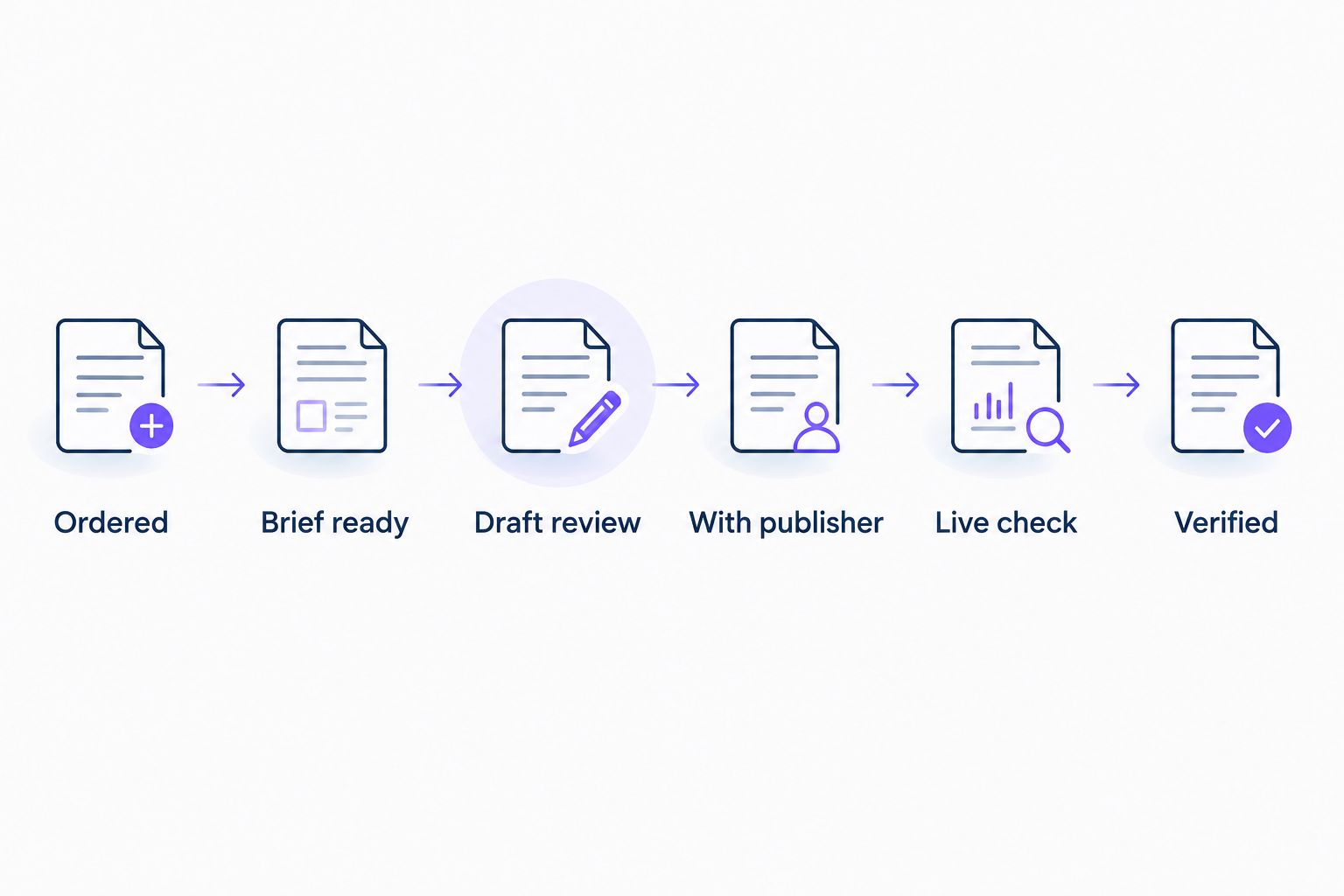
The board makes missing handoffs visible. Its limitation is equally clear: moving a card changes your project record, not the publisher's article. Someone still needs to perform the work behind each transition.
Create the placement record
Use the order reference as the placement's identity. Article titles change during editing, so a title alone is a poor way to match a task to an order.
- In Ordered, select Add task. Name the task using the client, publisher, and actual order reference. Avoid putting confidential campaign details in a title that external collaborators will see.
- Open the task and set Assignee to the person accountable for the next action. Set Due date to that action's deadline, not an unconfirmed publisher publication date.
- Fill Description with the placement record below. Copy the agreed details exactly, especially the destination and anchor text.
- Add 5 subtasks: Prepare brief, Review draft, Send to publisher, Verify publication, and Record delivery. Give each subtask its own owner and due date when responsibility passes between people.
- Attach the brief or record its document location in the description. Check that the reviewer can open it before moving the task to Brief ready.
Use these description labels consistently:
| Record label | What belongs there | Why it matters |
|---|---|---|
| Order reference | Actual placement identifier | Matches the task to the source order |
| Publisher | Agreed publication and contact details | Identifies where the article belongs |
| Target page | Approved destination | Prevents accidental destination changes |
| Anchor text | Exact approved wording | Gives reviewers a clear comparison |
| Editorial brief | Topic, audience, requirements, exclusions | Keeps the draft on scope |
| Draft location | Current review document | Prevents approval of an older version |
| Publication evidence | Live article location and check notes | Supports delivery reporting |
| Next action | Action, owner, and deadline | Makes the handoff explicit |
Expected result: One task contains the information needed to write, approve, submit, and verify the placement. The owner does not need to reconstruct the agreement from scattered messages.
When recording a NO-BS Marketplace guest posting order, copy its actual reference and agreed details into this record. The task is your coordination layer, not a substitute for the original order.
Configure approval and publisher handoffs
A due date tells someone when to act. It does not tell them what counts as approval. Write those conditions before the draft arrives.
- Assign Prepare brief to the campaign owner. Require a confirmed topic, destination, anchor text, audience, and publisher requirements before completing that subtask.
- Move the parent task to Draft review when a reviewable draft exists. Assign Review draft to the actual approver and record the current document version in Description.
- Ask the approver to check accuracy, relevance, attribution, anchor placement, and destination. Record the decision in the task's comment composer and select Comment. A completed subtask alone does not explain what was approved.
- If changes are required, keep the task in Draft review. Assign the revision action and identify the unresolved issue; do not move the placement forward merely because someone left feedback.
- After approval, assign Send to publisher to the publisher-contact owner. Move the parent task to With publisher after submission, and record the submission date and the version sent.
Expected result: The task shows who approved which draft and who owns the publisher follow-up. Submission is distinguishable from approval and publication.
Before approving the draft, use the principles in how to choose anchor text when buying backlinks. Keep the agreed anchor in the placement record so a publisher edit is detectable later.
For paid placements, include disclosure and link qualification in the brief. Google's guidance calls for paid links to be qualified with rel="sponsored"; nofollow is also acceptable. A tidy Asana board does not turn a paid ranking-manipulation campaign into a compliant one.
Keep approval authority explicit in your 2026 campaign instructions. A writer can finish a draft without having authority to approve a destination change or accept a publisher's revised placement terms.
Configure publication verification
A publisher's live notification starts the final check. It does not finish it.
- Record the supplied article location under Publication evidence and move the parent task to Live check. Assign Verify publication to the person responsible for checking the page.
- Open the published article. Confirm that it is publicly accessible, appears on the agreed publisher, and contains the expected content. Compare material edits against the approved draft.
- Follow the backlink and verify the final destination. Check the visible anchor text and inspect the link's
relattribute against the agreed qualification requirements. - Record the check date, findings, and any correction request in the task. Add a screenshot or other evidence where useful, but remember that evidence captures the page at the time of review.
- Complete Verify publication only after resolving delivery issues. Finish Record delivery, move the parent task to Verified, and select Mark complete when no placement-delivery actions remain.
Expected result: Every completed placement has a checked article, a checked destination, and an auditable delivery record.
Keep publication, indexing, and campaign performance separate in 2026 reporting. A live article is not proof of Google indexing, and an indexed article is not proof that the backlink caused a ranking change.
If you want continuing checks, create a separate monitoring task rather than leaving the delivery task indefinitely open. That keeps completed campaign delivery distinct from later link maintenance.
Update existing placements without creating duplicate tasks
The adjacent workflow is managing a change to an existing placement: a revised draft, a publisher question, a changed publication date, or a correction after delivery.
Update the existing task whenever the placement stays the same. Create another parent task only when you have a genuinely separate placement or a separate monitoring action.
| Workflow | Best for | Advantage | Limitation |
|---|---|---|---|
| New placement task | A newly confirmed guest post order | Keeps delivery evidence together | Requires careful initial entry |
| Existing task update | Revisions and publisher updates for the same order | Preserves the approval history | Requires consistent comments and ownership |
For an existing placement, follow this sequence:
- Match the update to the order reference, not just the headline.
- Add the new information as a comment and update the relevant description entry. Preserve the distinction between the original agreement and a proposed change.
- Move the task to the section representing its current state. A draft needing renewed approval belongs in Draft review, even if it was previously submitted.
- Set Assignee and Due date for the next action. Complete the action only when the requirement has been met.
For a correction discovered after completion, reopen the placement task or create a clearly linked correction task according to your team's convention. Record what changed and who must resolve it; do not silently overwrite the original verification evidence.
Asana rules can support internal routing where your account provides them. Treat that as a later improvement: an automatic section move or assignment does not verify a publisher update, inspect a backlink, or establish approval.
Troubleshooting
The same order appears in multiple tasks
Compare order references and retain one delivery record. Move relevant comments, documents, and action details into that record before closing the duplicate. Search for the reference before entering another order.
The placement is overdue, but nobody owns the next action
Inspect the parent task's Assignee and the active subtask owner. Assign the actual next action and set a realistic deadline. Keep a publisher's estimated publication date in the description rather than treating it as an internal commitment.
A reviewer cannot open the draft
Check document sharing separately from Asana project membership. Task access does not automatically grant access to an external document. Share the correct version with the named reviewer before restarting the approval deadline.
A card reached Verified without a backlink check
Return it to Live check and reopen Verify publication. Require a check date and findings before completing it again. The board position is not evidence that verification happened.
The publisher changed the anchor or destination
Compare the published page against the placement record. Document the mismatch and assign a correction request to the publisher-contact owner. Do not edit the approved record to make an unapproved change look agreed.
Customize your workflow
Start with the smallest process your team will maintain. Add structure when a repeated problem justifies it, not because another field looks useful.
For agency delivery, separate client-visible updates from internal discussions. NO-BS Marketplace offers white-label link building and guest posting services; your Asana permissions and reporting documents still need their own disclosure and access decisions.
If custom fields are accessible, use them for information you need to filter repeatedly, such as client or placement type. Keep detailed editorial instructions in Description rather than squeezing them into short fields.
For a 2026 campaign review, distinguish confirmed orders, drafts awaiting approval, submissions awaiting publication, and verified placements. Those categories expose the delivery bottleneck without claiming SEO results the project cannot establish.
FAQ
How do I manage a guest post campaign in Asana?
Create one task per placement and move it through Ordered, Brief ready, Draft review, With publisher, Live check, and Verified. Record the order reference, approved destination, anchor text, owner, and publication evidence in that task.
Does this workflow automatically sync NO-BS Marketplace orders into Asana?
No. This guide uses manual order entry and manual publisher updates; any automated connection needs its own supported setup and testing.
Should each guest post have its own Asana task?
Yes, use one parent task for each placement. Keep preparation, review, submission, verification, and delivery recording as subtasks so the placement history stays together.
Can I run the workflow without Asana custom fields?
Yes. Sections, task descriptions, assignees, due dates, comments, and subtasks provide the baseline structure described here. Custom fields are an optional addition when your access supports them.
When should I mark a guest post task complete?
Mark the task complete after checking the published article and backlink and recording delivery evidence. A publisher's live notification alone does not satisfy the verification step.
What should I do when a publisher changes the approved anchor text?
Record the mismatch and assign a correction request to the publisher-contact owner. Keep the original approval visible so the team can distinguish an agreed change from an unapproved edit.
Does a verified guest post mean Google has indexed it?
No. Verified means your team checked the published placement against its delivery requirements. Track indexing and campaign performance separately from publication verification in your 2026 reporting.
One last thing
Make the parent task's due date represent the next controllable action, not the hoped-for publication date. That small distinction stops publisher delays from hiding overdue approvals and unanswered questions. Keep external estimates in the placement record, where they remain visible without misrepresenting your team's commitments.