
Best overall: Asana. Best for a database-led guest post campaign: Airtable. Best for a straightforward visual pipeline: Trello. This 2026 guide compares the best project management tools for guest post campaigns by how well they organize publisher records, writing, approvals, and publication checks—not by how many features appear on a product page.
- Asana leads the best project management tools for guest post campaigns when ownership and editorial handoffs matter most.
- Airtable suits guest posting teams that need connected publisher, placement, and client records.
- Trello suits a visual pipeline; ClickUp suits configurable workflows; Notion suits documentation-led teams.
- NO-BS Marketplace handles guest posting and placement sourcing, not general-purpose project management.
Why this matters
A guest post campaign is not finished when a writer submits a draft. Someone still needs to approve the content, coordinate with the publisher, check the published link, and record what actually went live.
Your project management tool should make those handoffs explicit. A task marked complete without a live URL tells your account manager very little.
NO-BS Marketplace connects SEO professionals and agencies with verified publisher sites for guest posts and other placements. Keep that sourcing function separate from the internal workflow you use to manage writers, editors, and client approvals.
What makes the best guest post campaign management tool?
For this 2026 shortlist, the criteria are practical:
- Ownership: Each placement needs an accountable owner and a visible next action.
- Workflow visibility: Your team must distinguish drafting, approval, publisher submission, and publication verification.
- Structured records: Target URLs, proposed anchors, publisher domains, and live URLs need predictable homes.
- Editorial context: Briefs, draft links, feedback, and approval decisions should stay attached to the placement.
- Useful views: Writers need their assignments; account managers need the campaign picture.
- Maintenance burden: A system that needs constant rebuilding creates another job instead of organizing the existing one.
Treat publisher quality as a separate decision. A tidy board does not establish whether a placement is relevant, editorially sound, or compliant with search engine policies.
Guest post project management tools at a glance
| Tool | Best for | Standout feature | Key limitation |
|---|---|---|---|
| Asana | Editorial ownership and handoffs | Tasks, subtasks, and project views | Publisher relationships need deliberate record design |
| Airtable | Connected publisher and placement records | Linked records and database views | Requires a clear data structure |
| ClickUp | Configurable agency workflows | Custom statuses, fields, and multiple views | Configuration can become excessive |
| Trello | A straightforward visual pipeline | Cards moving through workflow lists | Detailed reporting needs additional structure |
| Notion | Documentation-led editorial teams | Documents and databases together | Task discipline depends heavily on setup |
These are workflow recommendations, not a ranking of backlink quality or campaign results. None of these tools verifies a publisher’s suitability simply because you add that publisher to a project.
1. Asana: best guest post tool for editorial handoffs
Asana organizes work into tasks and projects, with assignees, due dates, subtasks, and different project views. For guest posting, use a placement task to hold the brief, draft reference, publisher details, and next action.
Asana is the best overall project management tool for guest post teams that need clear ownership from brief to publication. Its task-centered structure fits a campaign where several people handle different parts of the same placement.
Asana pros:
- Named assignees make responsibility visible.
- Subtasks separate writing, review, submission, and verification.
- List and board views support different working preferences.
- Task comments keep placement discussions attached to the work.
Asana cons:
- A publisher directory needs more planning than a task list.
- Overlapping projects can create confusion about which record is authoritative.
- Broad tasks such as “finish guest posts” still hide the actual handoffs.
Best for: Agencies with distinct account management, writing, and editing roles.
Start with a reusable placement structure rather than a sprawling campaign board. The guide to managing a guest post campaign in Asana covers the order-to-publication workflow.
Verdict: Buy Asana for ownership-led delivery; skip it as your only publisher database.
2. Airtable: best guest post tool for connected records
Airtable organizes information into tables with fields, linked records, and multiple views. You can structure publishers, clients, and placements as separate record types instead of repeating every publisher detail inside every task.
That distinction matters when a publisher appears across several campaigns. Store publisher information once, then connect the relevant placement records to it.
Airtable pros:
- Linked records connect publishers, clients, and placements.
- Field types encourage consistent campaign data.
- Different views expose different slices of the same records.
- A placement record can hold editorial and publication details together.
Airtable cons:
- Poor table design creates duplicated or confusing records.
- Database flexibility does not automatically establish clear task ownership.
- Your team needs agreement on field definitions and naming conventions.
Best for: Agencies whose main problem is organizing placement data across clients and publishers.
Build the relationship structure before adding dashboards. Decide whether a record represents a publisher, an article, or a purchased placement; mixing those entities makes reporting ambiguous.
Airtable should win because your information needs relationships, not because a spreadsheet has become untidy. Clean up the definitions first.
Verdict: Buy Airtable for connected campaign records; skip it if your team only needs a simple assignment board.
3. ClickUp: best guest post tool for configurable workflows
ClickUp combines task management with custom statuses, custom fields, documents, and multiple views. It suits teams that want to configure a shared workspace around their editorial process.
For guest posts, custom fields can separate the client, publisher, target URL, and publication evidence. Statuses describe where the placement sits; they should not also try to describe every reason it is delayed.
ClickUp pros:
- Custom statuses support a defined editorial pipeline.
- Custom fields keep placement details structured.
- Subtasks break a placement into accountable actions.
- Documents can keep campaign instructions near the tasks.
ClickUp cons:
- Excessive configuration makes routine updates harder.
- Different client workspaces can drift into incompatible structures.
- Extra views do not fix unclear responsibilities.
Best for: Agencies prepared to standardize a configurable workflow across recurring campaigns.
Choose a shared status vocabulary before inviting every team member to customize the system. Keep “waiting for publisher” separate from “needs client approval,” because those states require different next actions.
For a 2026 rollout, start with the fields your team actually uses to make decisions. Add another field only when someone can explain who maintains it and why it matters.
Verdict: Buy ClickUp for deliberate customization; skip it if nobody will own the workspace structure.
4. Trello: best guest post tool for a visual pipeline
Trello organizes work into boards, lists, and cards. A guest post card can move between lists as the placement progresses, with checklists, members, comments, and due dates supporting the work.
The appeal is visibility. You can see where cards are accumulating without first designing a database or a detailed reporting system.
Trello pros:
- Workflow lists make campaign stages easy to scan.
- Cards keep draft references and discussion together.
- Checklists support repeatable publication checks.
- Moving cards makes changes in status explicit.
Trello cons:
- Publisher relationship data needs conventions beyond the basic board.
- Large collections of cards become harder to review visually.
- Stage lists alone do not explain why a placement is blocked.
Best for: Teams that want a straightforward board and do not need extensive relational reporting.
Give every card a consistent title and a clear owner. Keep the publisher domain and client identifiable without opening a long discussion thread.
Avoid creating separate lists for every possible exception. Use the main lists for workflow stages and record the blocking issue inside the card; otherwise, the board stops representing a recognizable process.
Verdict: Buy Trello for a clear visual pipeline; skip it when connected records are the central requirement.
5. Notion: best guest post tool for documentation-led teams
Notion combines pages with databases, allowing editorial instructions and placement records to live in the same workspace. It fits teams that spend substantial effort maintaining briefs, publisher guidelines, and campaign documentation.
A placement entry can contain the assignment context alongside database properties for status and ownership. The risk is treating a detailed page as a substitute for an actionable task.
Notion pros:
- Briefs and placement records can sit together.
- Database templates support consistent assignment pages.
- Views help separate active work from reference material.
- Long-form instructions fit naturally within pages.
Notion cons:
- Flexible pages encourage inconsistent structures without clear rules.
- Long notes can bury the next action.
- A documentation workspace still needs explicit deadlines and owners.
Best for: Editorial teams whose main requirement is keeping detailed guidance attached to campaign records.
Use a template that opens with the next action, owner, and draft reference. Put background material below those essentials, where it supports delivery without obscuring it.
Keep publisher guidelines separate from campaign-specific approvals. A publisher’s general requirements and a client’s approval of a particular draft are different records of authority.
Verdict: Buy Notion for documentation-heavy delivery; skip it if your team already struggles to maintain task status.
How to set up the campaign before importing work
For your 2026 campaign template, use 6 stages with clear exit conditions. The names matter less than agreement about what each stage means.
Brief ready
Record the client, publisher, target URL, proposed anchor, and writing instructions. Give each placement 1 accountable owner, even when several people contribute.
Drafting
Attach the working draft and identify the writer. Keep 2 dates per assignment when needed: the internal handoff deadline and the agreed submission deadline. Do not treat either as a guaranteed publication date.
Internal review
Check the content against the brief and record the approval decision. Resolve anchor and destination changes before the article moves to the publisher.
Publisher review
Record submission and any requested revisions. A publisher’s acceptance belongs here; it is not evidence that the article is already live.
Live verification
Open the published page and check the destination URL, anchor text, placement context, and link attributes. Record the live URL and verification date rather than relying on a completion message.
Reporting
Report the verified placement separately from traffic or ranking outcomes. NO-BS Marketplace guest posting orders can sit within this broader workflow, but internal approvals and outcome reporting still need defined ownership.
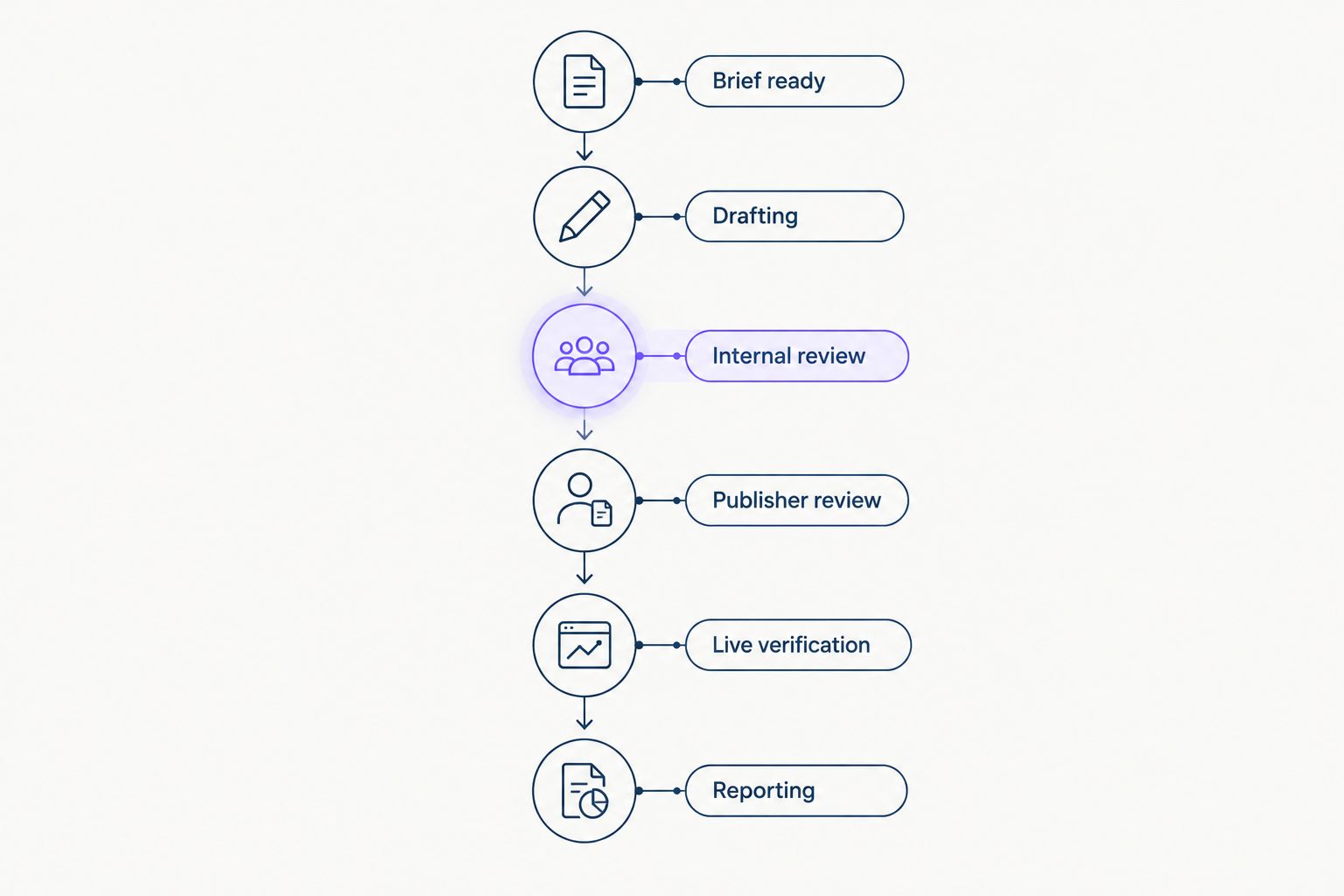
Do not automate a handoff until you can describe its exit condition. Moving an incomplete record faster only passes the missing information to someone else.
How the tools are ranked
The ranking prioritizes ownership, workflow visibility, structured records, editorial context, useful views, and maintenance burden. Asana takes the default position because the task-and-handoff model directly matches editorial delivery.
Airtable ranks next for teams whose information structure matters more than a conventional task board. ClickUp, Trello, and Notion each earn a distinct slot rather than competing for an identical use case. This is a workflow-fit assessment, not a benchmark test or a claim of measured productivity gains.
Which tool should you choose?
Choose Asana if you are undecided. Build a placement template, run an existing campaign through it, and check whether every active placement has an owner and a next action.
Choose Airtable instead when publisher and client relationships drive your reporting. Choose ClickUp for configurable delivery, Trello for board simplicity, or Notion for documentation-led work.
Keep your existing tool if it already meets those requirements. A 2026 migration needs a specific operational reason—not a new interface. NO-BS Marketplace belongs on the sourcing side of that decision, not in a forced comparison with general project management software.
FAQ
What's the best project management tool for guest post campaigns?
Asana is the best default for guest post campaigns that depend on clear task ownership and editorial handoffs. Airtable is the stronger fit when connected publisher, client, and placement records are the main requirement.
Is Trello enough to manage a guest post campaign?
Trello is enough when your team needs a visual pipeline with cards, owners, deadlines, and checklists. Choose a more structured setup when publisher relationships and cross-client reporting become central to delivery.
Is Airtable better than Asana for guest posting?
Airtable is better for connected campaign data; Asana is better for a task-centered editorial workflow. Choose according to whether your main problem is record structure or accountability.
Can Notion manage guest post briefs and approvals?
Notion can organize guest post briefs, placement records, and approval notes through pages and databases. Use a consistent template so the owner, deadline, and next action remain visible.
Does NO-BS Marketplace replace a project management tool?
NO-BS Marketplace is a link building and guest posting platform, not a general-purpose project management tool. Use your campaign workspace to coordinate internal writing, approvals, verification, and reporting around placement sourcing.
What information should every guest post task contain?
Every guest post task should identify the client, publisher, owner, status, target URL, proposed anchor, and draft reference. Add the live URL and verification date after publication.
Does a completed guest post task mean the backlink helps rankings?
A completed guest post task does not establish ranking impact. Verify publication separately from referral traffic, indexing, and search performance, and do not treat a paid placement as a guaranteed ranking benefit.
One last thing
Keep “published” separate from “verified.” An article can be live while the destination URL, anchor, or link attributes differ from the approved brief. That distinction belongs in your workflow before the next campaign starts, not in a client complaint afterward.