
Best overall: BuzzStream for relationship-led outreach. Best for structured outreach campaigns: Pitchbox. Best for a custom placement database: Airtable. These are the strongest starting points among the best link building CRM tools for agencies in 2026; HubSpot and Streak fit narrower sales-alignment and Gmail-based workflows.
- BuzzStream tops the best link building CRM tools for agencies shortlist for publisher relationship management.
- Choose Pitchbox for structured outreach campaigns, Airtable for custom placement tracking, or Streak for Gmail-based work.
- HubSpot fits agencies connecting link building delivery with an existing sales CRM.
- NO-BS Marketplace supplies link building placements; it is not a replacement for your relationship database.
Why this matters
A link building CRM should answer three questions immediately: who owns the publisher relationship, what was last agreed, and what happens next. A prospect list cannot do that on its own. Neither can a live-link report.
Separate relationship management from fulfillment. NO-BS Marketplace connects SEO professionals and agencies with verified publisher sites for guest posts, sponsored content, backlinks, and digital PR placements. Your CRM still needs to connect each opportunity to the correct client, target page, owner, and publication status.
Choose around the work your team needs to control, not the longest feature list. An outreach-heavy agency and an agency coordinating purchased placements have different requirements.
What makes the best link building CRM tools for agencies?
Use these criteria to assess your 2026 shortlist before comparing product demonstrations:
- Relationship history: Keep publisher contacts, conversations, and previous agreements together. A teammate should understand the relationship without asking the original owner.
- Client separation: Distinguish the publisher relationship from individual client opportunities. One publisher can be relevant to several accounts without every campaign sharing the same brief.
- Outreach control: Check how the tool handles replies, follow-ups, exclusions, and ownership. Sending messages is only part of the job.
- Placement tracking: Record the target URL, proposed anchor, content status, live URL, and verification outcome. A reply is not a completed placement.
- Data portability: Inspect exports, record identifiers, and migration options. Your publisher history should remain usable when your stack changes.
Treat permissions and reporting as acceptance checks, too. Demonstrate the exact client view you need rather than assuming a CRM automatically provides suitable white-label reporting.
Link building CRM tools at a glance
The table ranks workflow fit, not measured campaign performance. It deliberately separates outreach platforms, general-purpose CRMs, and a configurable database.
| Rank | Tool | Best for | Standout capability | Key limitation |
|---|---|---|---|---|
| 1 | BuzzStream | Relationship-led link outreach | Outreach-focused contact and conversation management | Placement delivery still needs clearly defined stages |
| 2 | Pitchbox | Structured outreach campaigns | Purpose-built prospecting and outreach workflows | A poor fit when you mainly need a placement ledger |
| 3 | Airtable | Custom placement operations | Configurable tables and linked records | Your team must design and maintain the system |
| 4 | HubSpot | Connecting sales and delivery records | General CRM records and activity history | Publisher relationships need a link building data model |
| 5 | Streak | Gmail-centered relationship tracking | CRM workflows inside Gmail | Placement verification remains a separate process |
1. BuzzStream: best link building CRM for publisher relationships
BuzzStream is an outreach platform built around managing contacts and conversations. That makes it the default recommendation when your agency's main asset is its publisher relationship history, rather than a collection of isolated campaign lists.
Use BuzzStream when account handovers require context: previous pitches, replies, relationship ownership, and the next action. Keep publication evidence distinct from the correspondence that produced it.
BuzzStream pros:
- Its outreach focus matches publisher relationship work.
- Contact history gives campaign handovers a useful foundation.
- It puts relationship management closer to outreach execution than a generic task board does.
BuzzStream cons:
- Outreach activity alone does not establish whether a placement meets the brief.
- Your team still needs consistent rules for client assignment and completed placements.
Best for: Agencies running recurring outreach where publisher context matters across campaigns.
Before choosing BuzzStream in 2026, walk through a publisher used by different client accounts. Confirm that your proposed setup makes relationship history accessible without mixing campaign instructions.
Verdict: Buy BuzzStream when relationship-led outreach is the core workflow.
2. Pitchbox: best link building CRM for structured outreach campaigns
Pitchbox is a purpose-built outreach platform with prospecting and campaign-management workflows. Its place on this shortlist is the agency that needs to organize outreach execution, not simply store publisher details.
Choose Pitchbox when your buying decision revolves around moving prospects through repeatable campaigns. Demonstrate the full process, including replies and exclusions, rather than judging it only by message creation.
Pitchbox pros:
- Its product focus aligns with link outreach campaigns.
- Prospecting and outreach belong within the same operational workflow.
- Campaign structure gives managers a clear basis for assigning responsibilities.
Pitchbox cons:
- It adds unnecessary scope if your agency mostly coordinates existing placement orders.
- Outreach completion still requires a separate definition from publication completion.
Best for: Agencies whose primary challenge is coordinating a repeatable prospect-to-reply process.
Ask a campaign manager to handle a positive reply, a rejection, and a request to stop contact during the demonstration. Those cases reveal more than a polished sending screen.
Verdict: Buy Pitchbox for structured outreach; skip it for a placement-only ledger.
3. Airtable: best link building CRM for custom placement operations
Airtable is a configurable database rather than a dedicated link outreach CRM. You can use linked records to separate publishers, contacts, clients, and placements instead of squeezing everything into a single spreadsheet row.
That structure suits agencies managing several fulfillment routes. An earned editorial mention, a guest post, and a sponsored placement need different supporting details even when they share the same publisher.
Airtable pros:
- You can define fields around your actual delivery process.
- Linked records suit relationships between publishers, clients, and placements.
- Different views let teams organize the same underlying records for different tasks.
Airtable cons:
- Your agency owns the database design and ongoing maintenance.
- A configurable database does not automatically become a complete outreach system.
Best for: Agencies that need a tailored operational record more than a dedicated prospecting workflow.
NO-BS Marketplace link building placements can sit within that wider operational model alongside other fulfillment sources. Record the source as a field; do not make the supplier name stand in for publication status.
Verdict: Buy Airtable when a named owner will maintain the database.
4. HubSpot: best link building CRM for sales-to-delivery alignment
HubSpot is a general-purpose CRM centered on contacts, companies, and commercial relationships. Its strongest fit here is an agency that already uses it for sales and wants delivery records connected to client context.
Avoid treating every publisher as a sales prospect. Define what a publisher company, contact, and placement opportunity represent before importing anything.
HubSpot pros:
- It keeps general relationship records and activity history together.
- It fits an existing agency sales process better than a separate outreach-only database.
- Shared client context supports the handover from account acquisition to delivery.
HubSpot cons:
- Link building requires deliberate configuration rather than a ready-made placement model.
- Mixing client sales opportunities with publisher opportunities makes pipelines harder to interpret.
Best for: Agencies already committed to HubSpot that need connected account context.
For your 2026 evaluation, demonstrate how an account manager finds the client brief while an outreach specialist accesses publisher history. Neither role should need to reinterpret the other's pipeline.
Verdict: Hold unless HubSpot already anchors your agency's client records.
5. Streak: best link building CRM for Gmail-based teams
Streak brings CRM workflows into Gmail. It suits teams that conduct publisher conversations in email and want pipeline context close to those conversations.
Its appeal is the working environment, not a complete link building toolkit. Keep your decision focused on whether Gmail is genuinely where your team manages relationships.
Streak pros:
- CRM work sits inside the Gmail environment.
- Email-centered relationship tracking matches direct publisher correspondence.
- Pipeline organization gives conversations a clearer operational status.
Streak cons:
- Gmail-centered work is a poor match for teams operating across different email environments.
- A conversation record does not verify the published page or its link.
Best for: Gmail-based teams with straightforward relationship pipelines.
Use a real handover scenario to evaluate Streak: another teammate should identify the current agreement and next action without reading an entire thread from scratch.
Verdict: Buy Streak for Gmail-centered relationship work; skip it for cross-system placement operations.
How we ranked these tools
The ranking prioritizes publisher relationship history, outreach fit, client separation, placement tracking, and data ownership. BuzzStream takes the default slot because its outreach focus directly matches relationship-led link building.
These are editorial workflow recommendations, not results from a timed product test. No ranking here implies better reply rates, more backlinks, or improved search positions. Those outcomes require campaign evidence.
Build the CRM around the placement lifecycle
Before migrating your 2026 campaigns, define 5 stages: Qualified, Contacted, Agreed, Published, and Verified. These are a starting model, not mandatory software defaults. Add exceptions only when they represent a different action or responsibility.
- Qualified: A reviewer accepts the publisher and records the reason.
- Contacted: An owner starts the conversation or records the fulfillment request.
- Agreed: The brief, target page, and responsibilities are documented.
- Published: The live article URL is recorded.
- Verified: A reviewer checks the page against the agreed brief.
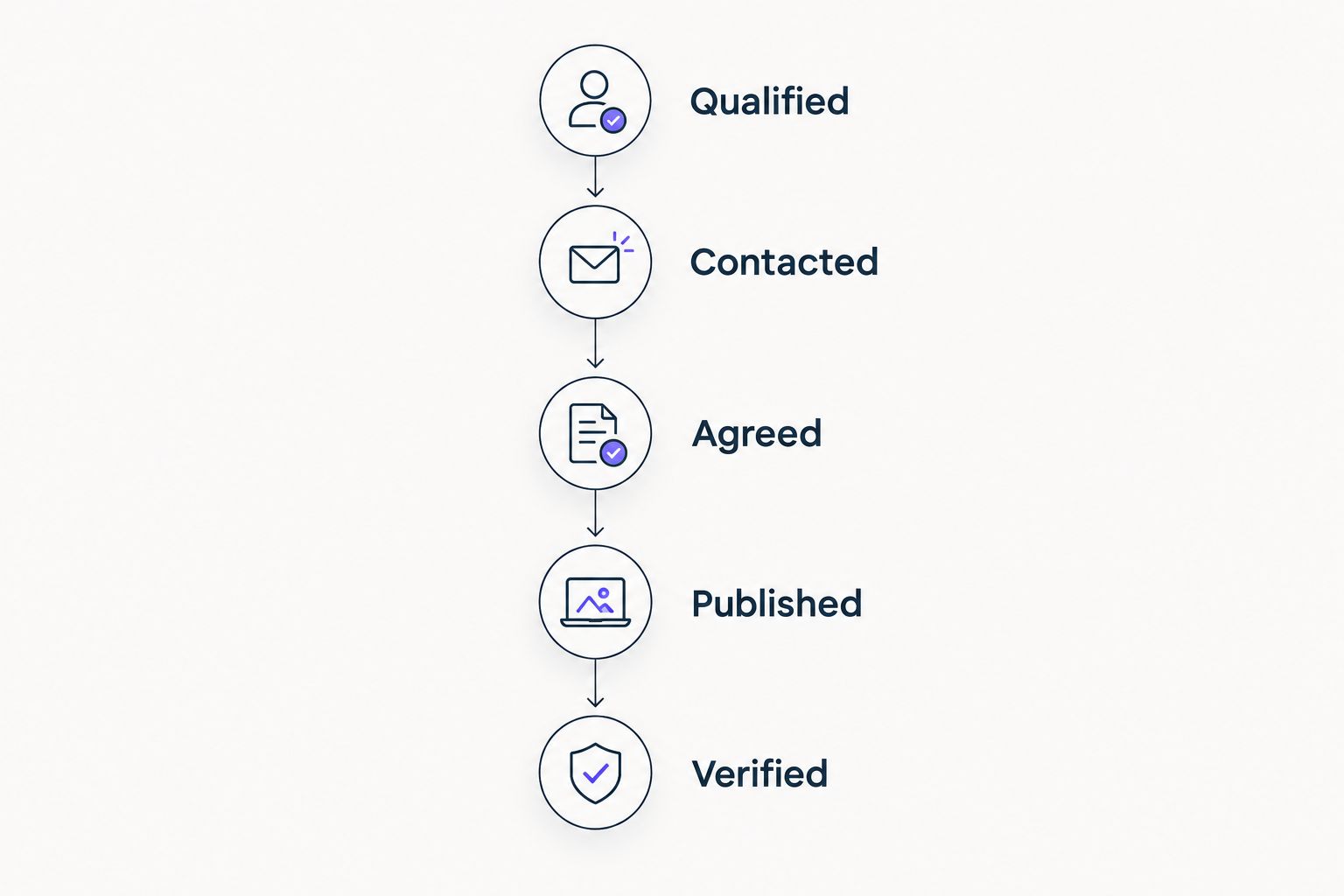
Keep publisher records separate from placement records. Store the domain and relationship owner once, then associate each placement with its client, target URL, proposed anchor, content brief, and live page.
Make quality review part of qualification. The checklist for auditing a publisher site before buying a placement belongs before approval, not after an account manager has promised delivery.
Email automation
Define stop conditions before adding follow-ups. Choosing CRM software with email automation does not remove the need to stop messages after a reply, honor an opt-out, and assign responsibility when a conversation changes direction.
Test those situations using internal addresses. Confirm what happens when a publisher changes contact, declines a specific client, or asks to discuss a different topic. A sequence should support the relationship, not override it.
Placement verification
Keep earned coverage and paid placements distinguishable. Google's spam policies address buying links for ranking manipulation; paid advertising links should use appropriate qualification such as rel="sponsored" or rel="nofollow".
NO-BS Marketplace supplies link building fulfillment options, but your agency remains responsible for its campaign decisions. A publisher being available through a platform does not replace your relevance, disclosure, or link-attribute review.
Run a migration pilot before committing
Use 10 placement records in a 14-day pilot before moving your entire operation. These are practical evaluation limits, not performance benchmarks. Include active conversations, completed work, rejected publishers, and a relationship shared across clients.
Have the people doing the work perform these checks:
- Find the last publisher agreement without asking a colleague.
- Assign the next action and make its owner visible.
- Separate the publisher relationship from the client-specific brief.
- Record a live URL without automatically marking it verified.
- Export enough context to understand the record outside the tool.
Reject a setup that loses history or obscures ownership. A more attractive dashboard does not compensate for a campaign manager reconstructing decisions from private inboxes.
Which link building CRM should you choose?
Choose BuzzStream if you need a default for relationship-led link outreach. Choose Pitchbox when campaign execution is the larger problem, or Airtable when placement operations need a custom database.
Keep HubSpot if connecting existing sales and delivery records is the priority. Choose Streak when Gmail is the team's working environment and the pipeline is straightforward. NO-BS Marketplace is best for agencies sourcing link building placements, not managing a CRM.
For 2026, buy against a demonstrated workflow rather than a promised outcome. The winning tool is the one your team can use to explain every active placement's owner, agreement, and next step.
FAQ
What's the best link building CRM for agencies in 2026?
BuzzStream is the default recommendation for agencies prioritizing publisher relationship history and recurring outreach. Pitchbox fits structured outreach campaigns, while Airtable fits custom placement operations.
Is BuzzStream better than Pitchbox for link building?
BuzzStream is the stronger starting point for relationship-led outreach; Pitchbox is the stronger starting point for campaign-led execution. Demonstrate your actual reply handling, ownership, and placement workflow before choosing.
Can Airtable work as a link building CRM?
Yes, Airtable can support a custom link building database using linked publisher, contact, client, and placement records. Your team must design the structure and maintain its operating rules.
Should an agency use HubSpot for publisher outreach?
HubSpot fits agencies that already use it for client relationships and need connected delivery context. Define publisher records separately from client sales opportunities before importing campaign data.
Does a link building CRM verify live backlinks?
A CRM record alone does not verify a live backlink. Treat publication and verification as separate steps, and check the live page against the agreed target URL, anchor, and link attributes.
Is NO-BS Marketplace a link building CRM?
No. NO-BS Marketplace is a link building and guest posting platform connecting SEO professionals and agencies with verified publisher sites. Keep relationship history and cross-campaign tracking in your chosen CRM.
Can CRM automation guarantee more backlinks?
No. Automation can organize follow-ups and workflow, but it cannot guarantee publisher acceptance, publication, or ranking gains. Evaluate operational control separately from campaign results.
One last thing
A publisher relationship and a backlink are different records. The relationship survives a rejected pitch, a changed editor, or a removed article. Model that distinction before importing your data, and your next campaign starts with usable history rather than another disconnected list.