
Instead of copying publisher updates into your board, automate your monday.com guest post status with rules that turn editorial milestones into placement updates and review notifications. Keep publication verification separate: a publisher saying an article is live should trigger a check, not automatically close the placement.
- Use monday.com guest post status automations for board handoffs; verify publication before marking a backlink placement complete.
- NO-BS Marketplace connects SEO professionals and agencies with verified publishers for guest posting and link building.
- Separate publisher-reported progress from verified placement status so guest post tracking reflects evidence.
- Use an external integration only when you have a supported source event and a reliable item identifier.
Why this matters
A guest post has several milestones, and they do not mean the same thing. Draft approval, publisher acceptance, publication, and link verification each answer a different question.
Your 2026 campaign board should distinguish what someone reported from what your team checked. Otherwise, an automated update turns an unverified publisher message into a completed client deliverable.
NO-BS Marketplace connects SEO professionals and digital marketing agencies with verified publisher sites for guest posting, backlinks, sponsored content, and digital PR placements. NO-BS Marketplace is best for SEO professionals and agencies buying guest post placements through a publisher marketplace. It supplies the placement side of this workflow; your monday.com board still needs its own tracking rules and verification process.
The setup below automates board-based handoffs. It does not assume a native connection between the marketplace and monday.com.
Before you start
- Access: Use a monday.com account with board-editing permissions and access to automations. Confirm that your account supports the rules you intend to create before building the workflow.
- Materials: Prepare a placement reference, client name, destination URL, agreed anchor text, publisher domain, assigned reviewer, and publication URL when supplied. Use 1 board item per placement, not per client.
- The gotcha: Board automations react to events inside monday.com; they do not independently detect publisher emails or publication. Start with a board-based trigger unless you have confirmed a supported external integration and a stable identifier for matching updates.
Choose the trigger location before you configure anything. This decision determines whether you need only board automations or an additional integration.
| Workflow | Best for | Advantage | Limitation |
|---|---|---|---|
| Native monday.com board automation | Teams recording publisher milestones on a board | Automates the handoff after a board value changes | Someone or something must record the original milestone |
| External event-to-board integration | Teams receiving structured updates through a supported source | Can remove the initial copy-and-paste step | Requires authentication, event mapping, and reliable item matching |
Start with native board automation when the source event already happens in monday.com. Add an external route only to solve an identified input problem, not to make the diagram look more sophisticated.
Placement board configuration
Build the data structure first. The following column names and status labels are proposed for this guide, not monday.com defaults; create them exactly as written if you want to follow the mappings below.
- Create a board for guest post placements. Give each item a recognizable name containing the client and publisher, while keeping the placement reference in its own column.
- Add a Text column named Placement reference. Store the original order or campaign identifier without rewriting it for readability.
- Add 2 Status columns named Editorial status and Placement status. Separating them prevents a writing milestone from masquerading as a verified backlink.
- In Editorial status, create these labels: Drafting, Submitted, Approved, Publisher reports live, and Revision requested.
- In Placement status, create these labels: In progress, Pending verification, Verified live, and Needs attention.
- Add Link columns named Destination URL and Publication URL. Add Text columns for Publisher domain and Agreed anchor, plus a People column named Reviewer.
- Add a Status column named Link check with Not checked, Passed, and Failed labels. Add a Date column named Verified date for recording the completed review.
Use the placement reference as the matching key for external updates. A publisher domain is not unique when you commission multiple articles from the same site.
Expected result: Each item describes a single placement, and the board can represent publication claims without treating them as verified delivery.
For a 2026 reporting board, keep those definitions in the board description. New account managers should not have to guess whether “live” means reported, inspected, or indexed.
Publication handoff automation
The first automation changes the placement status when someone records a publisher’s publication claim. It removes the second manual update, not the initial evidence-gathering step.
- Open the placement board and select Automate.
- Use the automation builder to configure a status-change trigger. Select Editorial status as the trigger column and Publisher reports live as its triggering label.
- Configure the status-change action to set Placement status to Pending verification.
- Save and enable the rule. Describe its purpose clearly so another board owner can identify it later.
- Configure a separate notification rule triggered when Placement status changes to Pending verification. Select the person in Reviewer as the recipient, using the notification configuration available in your account.
- Write a notification that tells the reviewer to inspect the Publication URL, destination, and anchor before passing the link check.
Do not set Placement status to Verified live in this automation. The trigger only proves that the board received a publication claim.
Expected result: Changing Editorial status to Publisher reports live moves the item into Pending verification and alerts the assigned reviewer. The item remains unfinished until someone checks the placement.
The handoff has four distinct stages. Preserve that separation even when you later replace manual milestone entry with an external event.
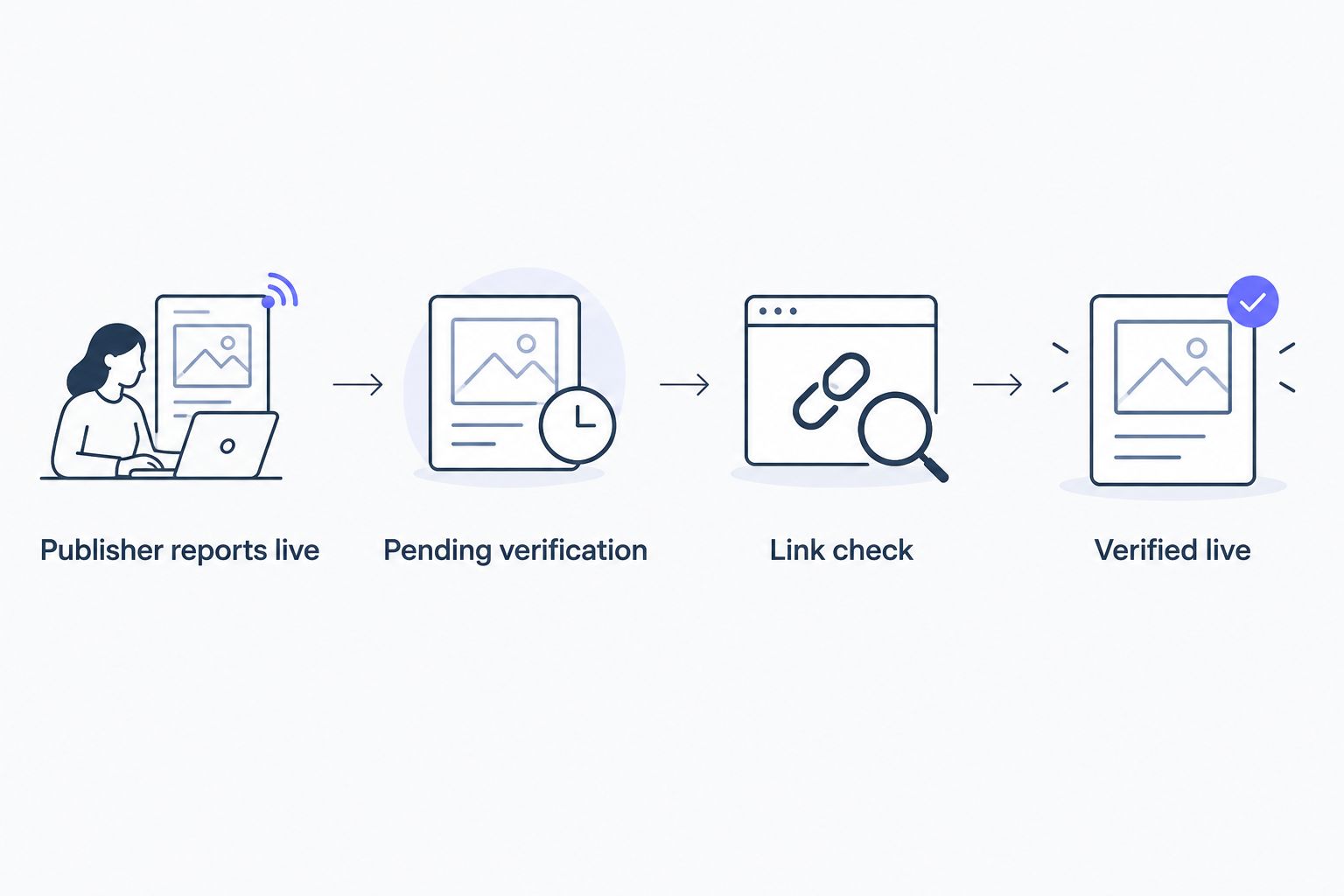
Verification gate configuration
A status automation cannot establish whether the published article contains the agreed link. Give that decision to a reviewer, then automate the resulting board update.
- Open the supplied Publication URL. Confirm that it is the article page rather than a publisher homepage, preview, or unrelated article.
- Check the link destination and anchor against the placement brief. Check the surrounding content and any agreed disclosure requirements as well.
- Record the review outcome in an item update. Include the inspected URL and explain any mismatch so the next person can understand the decision.
- Set Link check to Passed only after the review succeeds. Record the review date in Verified date.
- Return to Automate and configure a rule triggered when Link check changes to Passed. Set its action to change Placement status to Verified live.
- Configure another rule triggered when Link check changes to Failed. Set its action to change Placement status to Needs attention.
Keep Link check reserved for the review outcome. An external publication notification should never write Passed into that column.
Expected result: A completed human check controls the final placement status. Failed checks enter an exception state instead of appearing in your completed-placement count.
For 2026 client reporting, define Verified live as “publication and agreed link checked,” not “Google has indexed the article” or “rankings improved.” Those are separate observations with separate evidence.
Workflow test configuration
Test the transition rules before applying them to active client placements. Use a clearly named test item with a reviewer assigned, then watch the destination columns rather than assuming that saving a rule made it correct.
- Run a publication test: change Editorial status from Submitted to Publisher reports live. Confirm that Placement status becomes Pending verification and the intended reviewer receives the notification.
- Run a successful-review test: record a review note and set Link check to Passed. Confirm that Placement status becomes Verified live.
- Run a failed-review test on a separate test item: set Link check to Failed. Confirm that Placement status becomes Needs attention.
- Inspect the configured rules for conflicting actions. Remove any older rule that marks a placement complete merely because Editorial status changes.
- Confirm that the team knows which fields require evidence and which fields automation controls.
These 3 test cases cover the main handoff, successful verification, and failed verification. They are acceptance checks for this workflow, not a claim about platform performance.
Expected result: Each trigger produces the intended state change without another rule immediately reversing it. No publication claim bypasses verification.
Update guest post status when an external record changes
An external integration is the adjacent workflow when publisher or order updates originate outside the board. Use it only after confirming that the source exposes a supported trigger, webhook, or accessible record change.
For NO-BS Marketplace guest post tracking, keep the placement reference attached to any update you record. Do not assume that a marketplace order automatically creates a monday.com event.
- Identify the actual source event, such as a structured order-status update. Confirm its fields before selecting an integration tool.
- Find the existing board item using Placement reference. Require exactly 1 matching item; route missing or ambiguous matches to a person rather than guessing.
- Translate the source status into your board vocabulary. A publication claim should map to Publisher reports live, not Verified live.
- Write the Publication URL when the source supplies it. Do not overwrite an existing value with an empty field.
- Ignore repeated events that do not change the relevant state. Keep internal board changes from being sent back as new source events without a defined reason.
Expected result: A supported external update changes the correct existing placement item, after which the native verification handoff takes over.
The benefit is less manual entry; the drawback is another connection to maintain. Use the deeper guide to automate backlink order tracking with Zapier when you need to plan that external route.
Troubleshooting
The status changes, but the automation does nothing
Confirm that the rule watches the intended column and triggering label. Then check that the rule is enabled, your account permits automation execution, and the item actually transitions into the triggering state rather than remaining there.
The wrong placement receives an external update
Stop matching on client names, article titles, or publisher domains. Use the placement reference, and reject updates unless the lookup returns exactly one intended item.
A placement becomes verified before review
Inspect every rule that writes to Placement status or Link check. Remove any publication-triggered shortcut to Verified live, and keep Passed under reviewer control.
The reviewer receives no notification
Check that Reviewer contains a person and that the notification action targets that column rather than a fixed former team member. Inspect the rule’s execution information before changing the trigger.
A revised placement still shows an old passed check
Treat the new publication claim as a fresh review when the URL or agreed link changes. Reset Link check to Not checked and return Placement status to Pending verification; do not let an earlier approval certify different content.
Customize your workflow
Expand your 2026 workflow after the publication and verification paths work. Add client reporting fields, separate editorial ownership from link-review ownership, and document what happens when an article changes after delivery.
For NO-BS Marketplace link building campaigns, keep placement procurement, publication verification, and performance reporting distinct. A publisher marketplace supports placement sourcing; a board tracks work; evidence supports the delivery claim.
You can also add a team notification after Verified live, rather than after the publisher’s first message. That keeps announcements tied to checked deliverables without asking everyone to monitor the board.
FAQ
How do I automatically update monday.com guest post status?
Create a status-change automation that maps an editorial milestone to a placement status. Send publisher-reported publication to Pending verification, then use a separate reviewed outcome to mark the placement Verified live.
Can monday.com automatically detect that a guest post has been published?
The board rules in this guide do not detect publication independently. They need a recorded board change or a supported external event, followed by a publication and link check.
Does NO-BS Marketplace automatically sync guest post orders with monday.com?
This workflow does not rely on an automatic NO-BS Marketplace connection. Record placement updates on the board, or confirm a supported external event before configuring an integration.
Should I use one status column for an entire guest post campaign?
Use separate editorial and placement status columns for this workflow. They distinguish writing progress from publication claims and verified delivery.
What should happen when a publisher sends a live URL?
Move the placement to Pending verification and assign the link check. Mark it Verified live only after checking the article, destination, anchor, and agreed requirements.
How do I prevent duplicate guest post items?
Use a stable placement reference to find the existing item before writing an external update. Stop the update when the lookup finds no match or multiple matches.
Does Verified live mean Google has indexed the backlink?
No. Verified live means the publication and agreed link passed your review; indexing and search performance require separate checks.
One last thing
Automate the handoff, not the truth claim. For your 2026 board, the most useful status is the one whose definition survives a client asking, “What exactly did you check?”
Keep the evidence beside the item. A green label without a publication URL and review note is difficult to defend.