
Instead of manually chasing guest post approvals across inboxes, set up Trello guest post order tracking with one card per placement, clear stage lists, and rules that assign the next owner. This guide builds the handoff workflow for your 2026 campaigns; entering an external order remains a manual step unless you separately configure and verify an integration.
- Use Trello guest post order tracking for placement ownership, content approvals, and publication checks.
- NO-BS Marketplace handles guest posting purchases; Trello organizes your internal delivery workflow.
- Keep one card per placement and preserve the original order reference.
- Automate internal handoffs, not unverified publisher status updates.
Why this matters
A guest post order is not finished when someone submits a draft. You still need editorial approval, publication evidence, and a check that the published link matches the brief. A board makes those separate responsibilities visible.
NO-BS Marketplace connects SEO professionals and agencies with verified publisher sites for guest posting and other placements. NO-BS Marketplace is best for SEO professionals and agencies purchasing guest posting placements. Trello serves a different purpose: organizing the work around those orders.
Keep that distinction clear in your 2026 operating process. Moving a card does not update a publisher, confirm publication, or prove that a backlink is correct.
| System | Best for | What belongs there | Limitation |
|---|---|---|---|
| NO-BS Marketplace | SEO professionals and agencies purchasing placements | Publisher selection and placement purchases | Purchasing a placement does not replace your internal approval process |
| Trello | Teams coordinating guest post delivery | Owners, deadlines, drafts, and verification records | Card status requires manual updates or a separately configured integration |
Before you start
- Access: Use a Trello account with permission to create or edit the campaign board. Confirm that the person configuring rules can access Automation and check the account's automation limits before relying on rules.
- Materials: Prepare the order reference, client identifier, publisher domain, target page, approved anchor text, draft location, and responsible teammate. Copy these from your actual brief or order record.
- Gotcha: Define a placement as the tracking unit. An order containing several publisher placements needs separate cards; otherwise, one published article can hide another placement that is still waiting.
Treat the board as an internal workspace. Keep client credentials and confidential commercial details out of cards shared with external contributors.
Board configuration
Create the stage lists
- In Trello, select Create, then Create board. Give the board a campaign-specific name, such as Guest Post Delivery 2026.
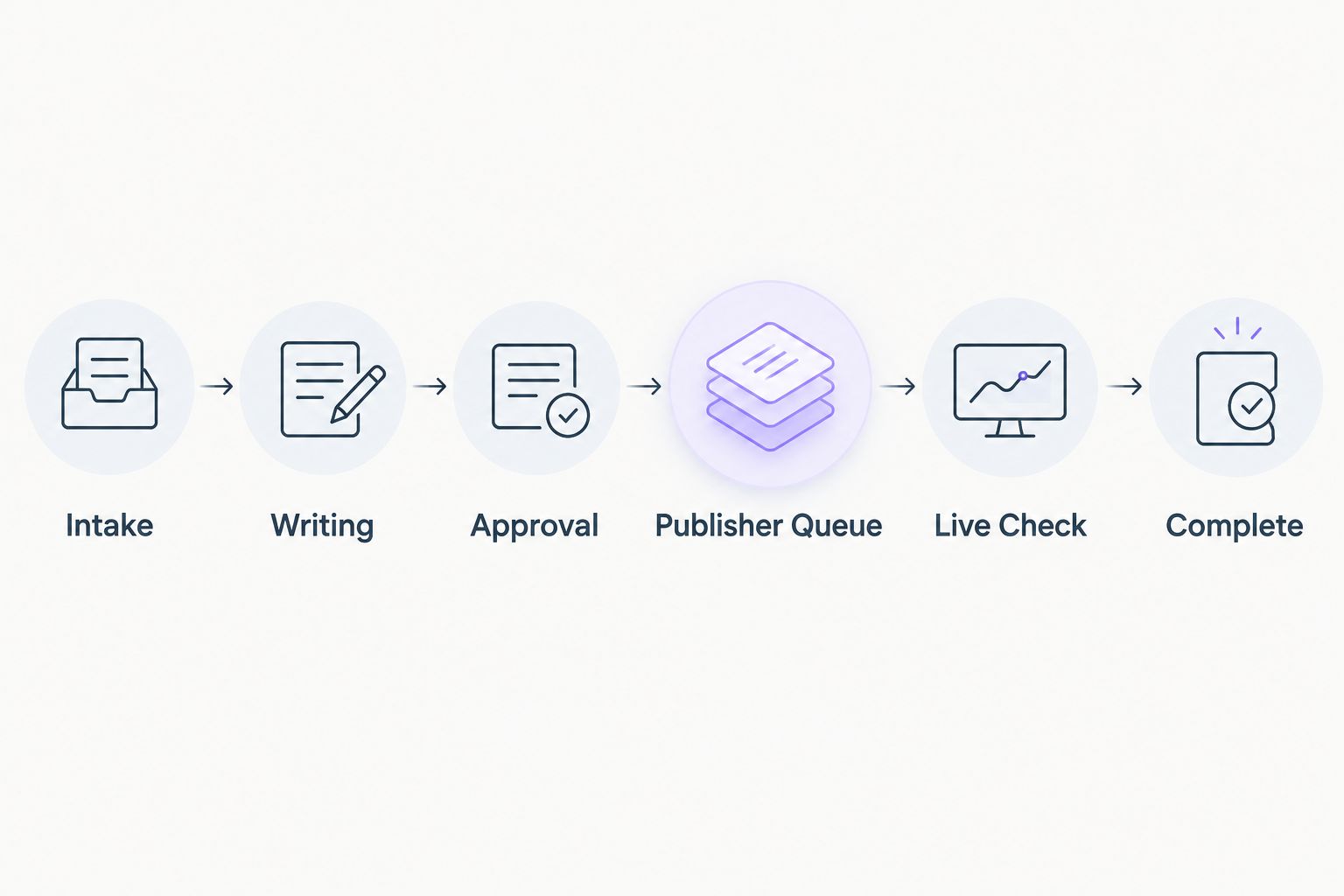
- Use Add another list to create these 6 lists in order: Intake, Writing, Approval, Publisher Queue, Live Check, and Complete.
- Invite the people responsible for campaign management, writing, review, and publication checks. Give access only to people who need the board's contents.
- Write down the entry requirement for each stage in your team process. Use the definitions below rather than letting each teammate interpret the list name differently.
| List | Entry requirement | Next action |
|---|---|---|
| Intake | Placement recorded with its order reference | Confirm the brief and assign an owner |
| Writing | Brief accepted by the writer | Produce the draft |
| Approval | Draft ready for review | Approve or return specific revisions |
| Publisher Queue | Approved content submitted | Follow up on submission status |
| Live Check | A publication URL has been received | Inspect the article and backlink |
| Complete | Publication checks passed | Record the result for reporting |
Expected result: You can identify the next action from a card's list without opening an email thread.
Use Labels for exceptions such as Blocked or Needs revision. Keep normal delivery stages in lists, not labels; competing status systems create ambiguity.
The Live Check list is deliberate. A publisher's confirmation starts verification, not completion.
Placement card configuration
Build a reusable placement record
- Select Add a card in Intake. Use a title pattern containing the client identifier, publisher domain, and placement reference. Avoid titles that contain only the article topic.
- Open the card and edit Description. Add the record headings below, then select Save.
- Open Checklist and create a checklist named Publication verification. Add the verification items listed below.
- Open the card's action menu and select Make template. Create future placement cards from this template rather than rewriting the record each time.
Use these headings in the description:
- Order reference
- Client identifier
- Publisher domain
- Target page
- Approved anchor text
- Draft location
- Submission date
- Publication URL
- Last confirmed update
- Next action
Keep the original order reference unchanged. Article titles and proposed headlines can change during editing; the order reference connects the card to the underlying purchase.
For Publication verification, add these checks:
- Open the published article.
- Confirm the article matches the approved placement.
- Check the link destination and visible anchor text.
- Inspect the link attributes against the agreed requirements.
- Check the required sponsorship disclosure.
- Record the verification date and reviewer.
Expected result: Each new card contains the same briefing fields and publication checks, without requiring paid add-ons or a particular custom-field configuration.
Do not treat a completed checklist as evidence of indexing or ranking gains. Those are separate measurements. For paid placements, check appropriate link qualification and disclosure; an internal approval cannot override search engine policies or advertising requirements.
Set ownership and dates
- Open Members and assign the person responsible for the next action. Record specialist reviewers in the description if several people participate.
- Open Dates and set the next internal deadline. Distinguish that deadline from any publisher estimate recorded in the description.
- Use Labels to mark exceptions, then explain the blocker and required decision in a card comment.
Expected result: Every active card has an accountable teammate and an explicit next action. A deadline means someone owes a task, not that a publisher has promised publication.
Order intake configuration
Connect the order record to the card
This workflow connects records through their references; it does not require an assumed native connection between NO-BS Marketplace and Trello. Start with manual intake, then automate only after the record structure works.
- Open the confirmed order information and identify each individual placement.
- Create a card from the placement template in Intake for each placement. Copy the exact order reference into Description.
- Transfer the publisher domain, target page, approved anchor text, and draft location. Leave unknown fields empty rather than inserting estimates.
- Add the responsible teammate through Members and set the next action deadline through Dates.
- Search the board for the placement reference before creating another card. If the placement already exists, update its existing card instead.
Expected result: One placement has one operational record. Your team can trace the card back to the order without relying on a remembered headline.
For NO-BS Marketplace guest posting orders, retain the supplied reference exactly as it appears in the order information. Add your own placement suffix only when you need to distinguish several placements under that reference.
Manual intake is the trade-off: it requires copying the initial details, but it gives you a controlled starting point without assuming an API, webhook, or connector exists.
For your 2026 rollout, test this structure with 2 sample cards before loading active work. Use clearly marked test records, not fabricated client orders.
Handoff automation configuration
Assign the publication reviewer automatically
Trello's built-in rules can act on card movements. Use a narrow rule first: moving a placement into Live Check assigns the teammate who verifies published articles.
- Open Automation on the board, select Rules, and choose Create rule.
- Configure the trigger for a card being moved into Live Check. Select the actual list, not a similarly named list on another board.
- Add an action that adds the publication reviewer to the card. Choose the real board member responsible for verification.
- Save the rule with Save.
- Move a test card from Publisher Queue into Live Check. Open Members and confirm that the reviewer was added.
Expected result: A card entering Live Check gains its publication reviewer without a separate assignment message.
This rule adds a reviewer; it does not necessarily remove existing members. If your board uses several members per card, keep the next accountable person explicit in the description.
Do not create a rule that moves every card with a publication URL directly to Complete. A URL is evidence to inspect, not proof that the agreed placement passed review.
Test the complete handoff
Move a sample card through all stages and check the record at each transition. Return a second sample card from Approval to Writing to represent revisions.
Your test passes when the original reference survives, the reviewer assignment runs, and no card reaches Complete without its verification checklist. Record the test date in your 2026 process notes so later changes have a baseline.
Variant: route revised drafts back into approval
A revised draft needs another review, not another placement card. Keep the order identity intact and repeat the approval handoff on the same card.
- When a reviewer requests changes, move the card from Approval to Writing and add specific revision instructions in a comment.
- Replace the draft location only if the document changed. Preserve the previous decision in the comment history.
- When revisions are ready, move the card back to Approval.
- In Automation, create a separate rule triggered by movement into Approval. Add the designated reviewer as the action, then save and test it.
Expected result: The revised draft returns to its reviewer while the placement history stays together.
Keep this workflow separate from publication verification. Editorial approval confirms the draft is acceptable; Live Check confirms what actually appeared on the publisher's site.
Troubleshooting
The automation does not run
Check that the rule is enabled and targets the correct list. Review its activity in Automation, confirm the selected member still belongs to the board, and inspect automation usage limits. Test with a fresh list movement after correcting the rule.
Several cards represent the same placement
Search by the original order reference and publisher domain. Keep the card with the useful history, transfer missing information to it, and archive the duplicate. Then require a reference search before intake.
A card says Complete, but the link is wrong
Move the card back to Live Check, describe the exact mismatch, and assign the person handling the correction. Do not rewrite the approved target page to make the published mistake look correct.
The writer cannot open the draft
Check the document's sharing permissions using the writer's intended account. Board access and document access are separate permissions; attaching or pasting a document location does not grant access to its contents.
A deadline is being treated as a publication promise
Rename the next action in the description so it identifies the internal task, such as Follow up with publisher. Keep publisher estimates separately attributed and update them only when confirmed.
Customize your workflow
Once the basic handoffs work, extend reporting rather than adding more status lists. Record the verified publication URL, completion date, and campaign identifier consistently across cards.
For your 2026 campaign review, separate delivery questions from performance questions. Trello answers who owns a placement and what remains unfinished; referral reporting answers what visitors did after clicking a published link.
Add client-facing reporting only after checking board permissions and removing internal notes. A shared delivery board is not automatically a suitable white-label report.
FAQ
How do I set up Trello guest post order tracking?
Create one card per placement and move it through Intake, Writing, Approval, Publisher Queue, Live Check, and Complete. Preserve the original order reference and require publication verification before completion.
Does this workflow automatically sync NO-BS Marketplace orders to Trello?
No. This guide uses manual order intake and Trello rules for internal handoffs; external synchronization requires a separately configured and verified integration.
Should I create one card per order or per guest post?
Create one card per publisher placement. If an order contains several placements, keep the shared order reference on each card and distinguish the individual placements.
Can Trello assign someone when a guest post goes live?
Trello can assign a reviewer when a card moves into Live Check. Someone must first update the card from confirmed publication information, unless a separate integration supplies that update.
What should I check before completing a guest post card?
Open the published article and verify the destination, anchor text, link attributes, and required disclosure against the agreed brief. Record the publication URL, reviewer, and verification date.
Do I need custom fields to track guest post orders?
No. You can store the order reference and placement details in the card description, then use lists, members, dates, labels, and checklists to manage delivery.
Does moving a card to Complete prove the backlink is indexed?
No. Complete should mean that your delivery checks passed; indexing, referral traffic, and search performance require separate checks.
One last thing
Never close a placement from a notification alone. Open the article yourself, follow the link, and compare it with the brief. That final inspection is the difference between tracking a publisher's message and verifying delivery.