
This post is an updated version of the internal links guide published back in 2022. While the information in the old guide remains valid, much has changed over the years. I recommend sticking to this new guide if you want the latest facts on internal link building.
Internal links are important in showing connections between webpages. They establish a connection and hierarchy by showing where the information starts and where visitors can go next. And while this has significant benefits to your audience, they also apply to search engines by helping them understand your website’s structure.
This means having a well-planned internal linking strategy is crucial to SEO success. But what is internal link building? Let’s take a closer look.
What is Internal Link Building?
Internal link building involves placing hyperlinks from one page to another on a website’s pages, creating a flow of content within the domain. Using the href attribute, internal links can be coded into a page as:

This hyperlink format uses descriptive keywords or phrases as anchor text, giving readers and search engines a clear indication of the target content. Strategic use of internal links helps build page authority and, ultimately, better search rankings.
For example, if I want readers to lead them to the NO-BS Marketplace homepage from this blog post, the code would be something like this:

This does more than benefit visitors from a user experience standpoint. Because search engines can’t understand context as well as humans do, this line of code provides a path for crawler bots to analyze and index the content. It also lets them know that both the NO-BS homepage and this post are related to an extent.
Google states that the href attribute is the only way it can reliably read internal links. Even so, there are guidelines for that, which we’ll discuss later. (1)
Types of Internal Links
The good thing about internal links lies in the versatility of their placement. You can place them anywhere on the page, provided that the link is relevant to the context for that part.
That said, there are various types of internal links, and each one works differently. It pays to understand the distinct roles they play in enhancing site crawlability, user interaction, and engagement with your site.
Contextual Links
Widely considered the most valuable of all types, contextual links can be found embedded into the body of a page (like the example earlier). Link building makes use of these links all the time, especially in creating guest posts or press releases.
As the term suggests, these links add context for the reader. One high-quality contextual link is more than enough—compared to several low-quality ones—to boost the content’s chances of climbing up the rankings. For this, they need to satisfy three elements. (2)
The placement within the content is natural, not forced
The linked page fits the context for the part of the content
The reader is made aware of where they’ll go upon clicking the link
While not a hard and fast rule, professionals often suggest placing contextual links close to the beginning for readers to notice early. Aside from guest posts, they can also be used for resource content (e.g., guides) and even images. They can lead anywhere on your website, not necessarily following its architecture.
These links may or may not be a ranking factor, as Google will refrain from disclosing such information to prevent inorganic link building. However, we know that contextual links are worth their weight in gold due to the algorithm favoring valuable and user-friendly content.
Structural Links
As opposed to contextual links, structural links follow the website’s structure. All internal links link from and to the homepage. In a way, they form the basis of how crawlers should navigate the domain and index its content efficiently.
These links are placed outside the content body. Some examples include: (3)
Blog loop: This feature in content management systems (CMS) allows a website to retrieve and display relevant blog posts. They’re often shown in a carousel system, enabling readers to choose which post to read next.

A blog loop at the bottom of a Search Engine Journal article
Breadcrumbs: True to their name, these links leave a trail (hence, “breadcrumbs”) that lets the user know exactly their location within the site. Clicking on each of the links enables them to return to the surface to explore further.
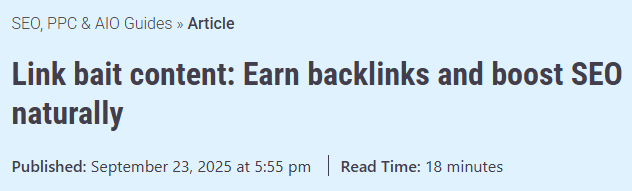
Breadcrumbs above the headline of a Search Engine Land article
Sidebar links: These links are primarily used to help visitors get around the website or the page’s content (known as bookmarks). They can be found on either side of a page, whether on full display or as a pop-up menu.
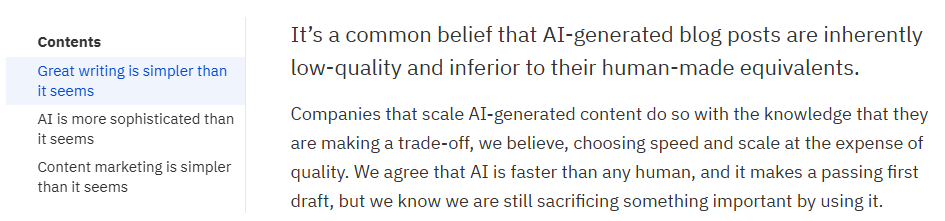
Bookmarks that lead to different sections of an Ahrefs blog post
Today’s CMS suites like WordPress are now designed to make the process of adding these links a breeze. In many cases, they may be generated as soon as a blog post is published.
Navigation Links
Sometimes called navigational links, these internal links are a type of structural link. But instead of helping navigate through articles and blog posts, they help visitors explore the website’s slew of pages. These include product and service pages, About Us pages, and even its sitemap (which can be helpful in SEO).
Among the most common navigation links are:
Main menu links: Located at the top of the page, main menu links lead visitors to specific areas of the website. While they commonly link to the second-tier pages, the addition of a drop-down menu enables linking to deeper ones.
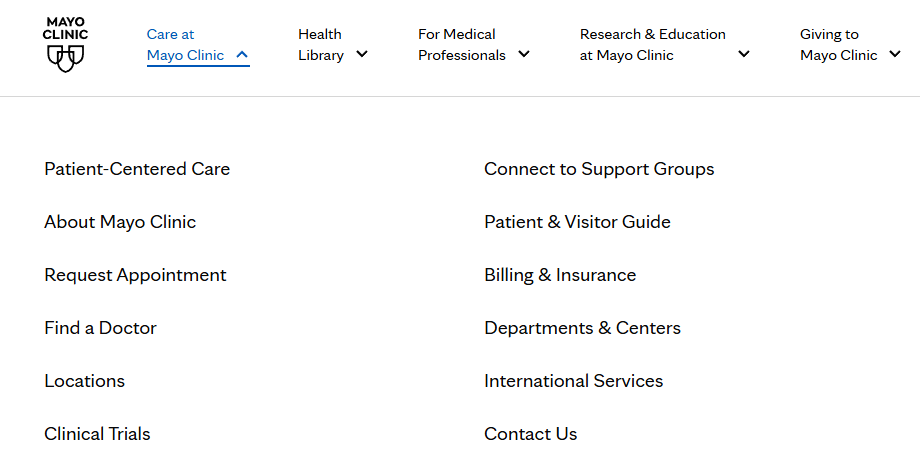
Mayo Clinic’s main navigation bar
Footer links: This second set of links is found at the bottom of the page. Aside from the main menu links, they also house other, less-explored ones, such as the site’s Privacy Policy, Terms & Conditions, and links to social media accounts.

Footer links on the Nielsen Norman Group’s official website
Sidebar links: Other websites have their main menu and other links placed inside a sidebar. As sidebars provide more space than topbars, websites can place plenty of links that lead to different areas of the website.

KFF Health News’s sidebar containing news summaries
When you put all these types together, that amounts to a boatload of internal links for just one website. All the more reason to plan how to get the most out of each one.
Benefits of a Good Strategy
Adhering to best SEO internal linking practices brings numerous benefits to your website. They include the following:
Better User Experience
User experience is a ranking factor. After all, that’s what Google’s Core Web Vitals are for.
Beyond that, a user-friendly website lets visitors complete their actions without hiccups. Proper placement of internal links enhances site navigation, from having a clear website structure to bridging the gap between pages in different areas. It’s better to click on a link that leads you directly than to press the Back button on your browser several times.
A lack of optimized internal links increases the risk of visitors “bouncing” or visiting the site but leaving without taking further action. While Google has clarified that bounce rate is not a ranking factor, it can impact your site’s traffic. Additionally, it also affects your content’s chances of getting cited or mentioned in AI-generated summaries.
Enhances Crawl Depth
Crawl depth refers to the number of clicks a crawler needs to reach the target page from the homepage. The magic number is no more than three. Any more, and the likelihood of crawlers reaching the deeper pages greatly diminishes.
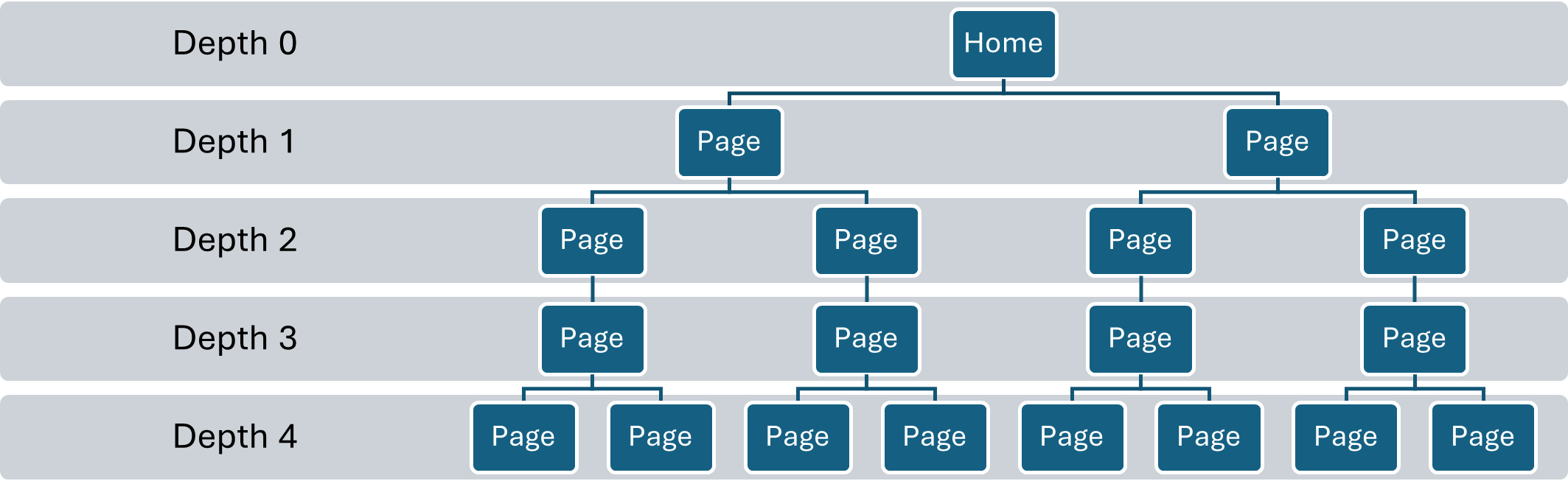
However, lowering crawl depth isn’t an option for websites with extensive architectures. For example, e-commerce sites may have highly niche product pages buried deep in the domain. Putting them closer to the surface may mess up the entire structure.
Internal links can do wonders for such sites. Breadcrumbs are a common design choice because they let users and crawlers know where the page sits relative to the whole site.
Improves Link Equity Distribution
Links not only pass user and crawl traffic. They also pass authority.
The industry refers to this as link equity, but professionals often call it “link juice.” As far as backlinks go, search engines recognize a page with a backlink from a reputable website as reliable because of the juice the former passes on.
But internal links also pass on link juice, even if diluted. In this case, instead of an external link, the source of the juice is a page within a site that gets a lot of traffic (e.g., homepage). If it links to other pages, they’ll benefit from some equity.
Best Practices for Internal Link Building
Follow Google’s Guidelines
As mentioned earlier, Google can only reliably process links coded using the href attribute. While it will attempt to parse non-href codes, they’re less likely to be crawled and indexed.
The anchor link should resemble a proper URL (e.g., http://nobsmarketplace.com/guest-posting). There’s no limit on how long a URL should be in this case, but fewer than 2,000 characters is a widely accepted figure. This way, users can access the link despite using different web browsers. (4)
As for anchor text, Google suggests against overly generic (e.g., “click here,” “read more”) or unnaturally long texts (e.g., “8 out of 10 patients trust chiropractors in Chicago”). In the latter’s case, experts recommend keeping it to no more than five words.
It also advises against bunching up multiple anchor texts next to each other. Instead, spread the texts out every single word or several words. (1)
This paragraph from a Yoast article separates two different internal links
Placement Is Vital
No link has ever been placed just because. If there ever was one, then it shouldn’t exist.
If you want to put internal links into your content, it’s important to understand what those links talk about. That determines where they’ll be located and what to write around them for a natural fit. Remember that internal links enhance user experience first and foremost, with SEO benefits a welcome bonus.
The right place for internal links depends on their type. Contextual links go within the body of the page’s content, but it’s important to know their context. Meanwhile, navigation and structural links are set outside the body.
Limit the Number of Links
You may be tempted to add more internal links to boost your rankings and AI mentions. But I’ll let Google’s John Mueller from 2021 explain why you’d want to resist the urge.
“If all pages are linked to all other pages on the website, where you essentially have a complete internal linking across every single page, then there’s no real structure there. It’s like this one giant mass of pages for this website, and they’re all interlinked, we can’t figure out which one is the most important one. We can’t figure out which ones of these are related to each other. And in a case like that, having all of those internal links, that’s not really doing your site that much.”
And remember when I said that internal links pass link equity? With so many linked pages, it’s diluted to the point that one page’s equity is no higher or lower than the other.
Instead of worrying about a tangible limit, consider focusing on building a solid structure for your website. Only add contextual links when the context calls for them. Meanwhile, navigation and structural links are necessary to ensure a good user experience.
On a related note, having only one internal link can be just as disadvantageous because it only gives crawlers one avenue to enter.
Find and Fix Errors
Link errors may not look much, but they’re link building opportunities, nonetheless. You may be surprised at how many of these are just sitting there doing nothing or impacting inbound traffic and user sessions. Some examples include:
Broken links (404 error): These links lead to a 404 error page, indicating a typo in the URL or that the page no longer exists. They can be resolved by correcting the typo, creating a new page, or changing the link to an existing page.
Orphan pages: These pages are isolated from the rest of the website due to a lack of internal links. They can stand alone or be linked to other orphan pages. Placing internal links can connect them to the website structure.
Unoptimized redirects: If you’ve made new versions of old pages recently, make sure the redirect is seamless. Going through the old page adds one unnecessary step that negatively impacts user experience.
SEO tools like SEMrush can scour your website for these errors.
Don’t Underestimate Internal Links
When people talk about link building, the focus is typically on backlinks—and I don’t blame them. Quality backlinks are one of the strongest signals for online content to rank in search results. But they’re by no means the only factor.
SEO is about taking every opportunity to rank higher, no matter how minor. Placing internal links and optimizing them can contribute to SEO success, even more when done properly.
References:
1. “Link best practices for Google,” Source: https://developers.google.com/search/docs/crawling-indexing/links-crawlable
2. “Are Contextual Links A Google Ranking Factor?” Source: https://www.searchenginejournal.com/ranking-factors/contextual-links/
3. “Use Structural Internal Linking To Boost User Experience & Rankings,” Source: https://jonathanboshoff.com/structural-internal-linking/
4. “Length of URL in Browsers,” Source: https://www.geeksforgeeks.org/computer-networks/maximum-length-of-a-url-in-different-browsers/