
The word “meta” refers to a person, place, or object that’s self-aware—an “X about X,” as it’s often referred to. An article about how to write an article is as meta as a documentary on how to make documentaries. English is amazing, isn’t it?
The SEO space has its own example of meta: metadata. Commonly defined as “data about data,” it’s information that identifies and explains specific data for use by machines. In this case, it teaches search engines and AI models what a certain detail is and how to utilize it. After all, it’s not like you can talk to machines the same way you do to a person.
Metadata has been around far longer than SEO or even search engines, and is still essential in today’s search. Let’s explore the different types of metadata, starting with one that’s no longer in use.
Meta Keywords
Meta keywords are how search engines understand the nature of every page they crawl on. Visitors don’t usually see these because they’re embedded in the page’s code, particularly the <head> section, along with other meta tags.
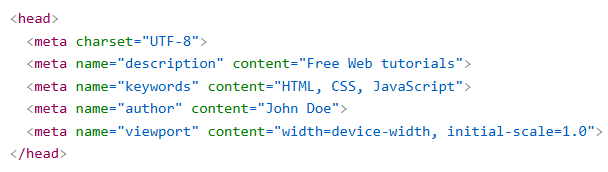
Source: W3Schools
You might think that linked anchor text in the content is how search engines spot keywords, but that’s only part of it. They also check other locations like the metadata in a page’s code. In the example above, the meta keywords tell the search engine that the page should rank for the keywords “html,” “css,” and “javascript.”
However, meta keywords have fallen out of use since Google announced it no longer considers them in its web rankings. Matt Cutts, in a 2009 Q&A video, discussed the rationale behind the decision.
Suppose you have two website owners, Alice and Bob. Alice runs a company called AliceCo, and Bob runs BobCo. One day, while looking at Bob's site, Alice notices that Bob has copied some of the words that she uses in her keywords meta tag. Even more interesting, Bob has added the words "AliceCo" to his keywords meta tag. Should Alice be concerned?
I’d be concerned if I were Alice because the meta keyword system is being misused. Sites can spam low-quality or irrelevant keywords in their content. The visitors will be none the wiser, as they’re invisible but prompt the content to appear in irrelevant queries.
Despite some search engines still using them, meta keywords are practically dead as far as modern SEO goes. That said, it won’t hurt to keep them in the code (if your website already has them) in case they covertly contribute to search visibility.
If you haven’t started using meta keywords, focus on the next item on this list instead.
Meta Title and Description
Meta titles and descriptions are the information that shows up in the “blue links” results.
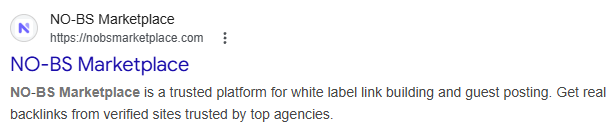
These forms of metadata provide both search engines and users with an idea of the page’s contents. Anytime a query is made, search engines will return results with an exact match in the meta title and description. In situations like a misspelled query, they’ll return results with words or phrases that are closer in context.
If a page doesn’t have a meta title or description, the search engine will generate one based on its content. Still, it’s better to make your own because you know your own content better than anyone. Here are a few best practices for creating meta descriptions from Google.
Keep it short: Although meta descriptions have no character count limit, long ones are truncated. It isn’t a major issue, but some context may be lost when reading. To avoid this, keep the description to no more than 160 characters (including spaces).
Keep it unique: Using one meta description for all your pages won’t help users get the information they need. A good example is a one or two-sentence summary for articles and blog posts, along with a keyword or two.
Keep it high-quality: Avoid taking meta descriptions for granted. Google advises against making them too short, a basic list of keywords, or the same for all pages. Otherwise, it’ll automatically change them into proper ones.
As for meta titles, you can get away with them being similar to the H1 titles. But if you’re going to do this, make sure that it’s optimized for search and is 60 characters (including spaces) long or fewer. If the H1 title is too long, consider shortening its meta title.
Meta Robots
Meta robots are used to indicate pages that shouldn’t be indexed or crawled, among other things. And before you say, “But we have robots.txt for that,” that’s what I thought, too.
There’s a world of difference between the two methods, starting with their capabilities. A robots.txt file is designed to restrict crawlers from crawling the website or multiple pages within the domain. For example, if I want Googlebot to prevent it from crawling my website, the file should contain the following:
User-agent: Googlebot
Disallow: /
User-agent: *
Disallow:
But keep in mind that a crawler block does NOT translate to a deindex. The page can still be visible in search results if other websites link to it. Also, blocking crawlers is pretty much all robots.txt does, which is useful for prohibiting malicious crawlers.
This is where the meta robots tag comes in. With its array of commands, it can control how search engines index and deliver a page in the results. Some examples include:
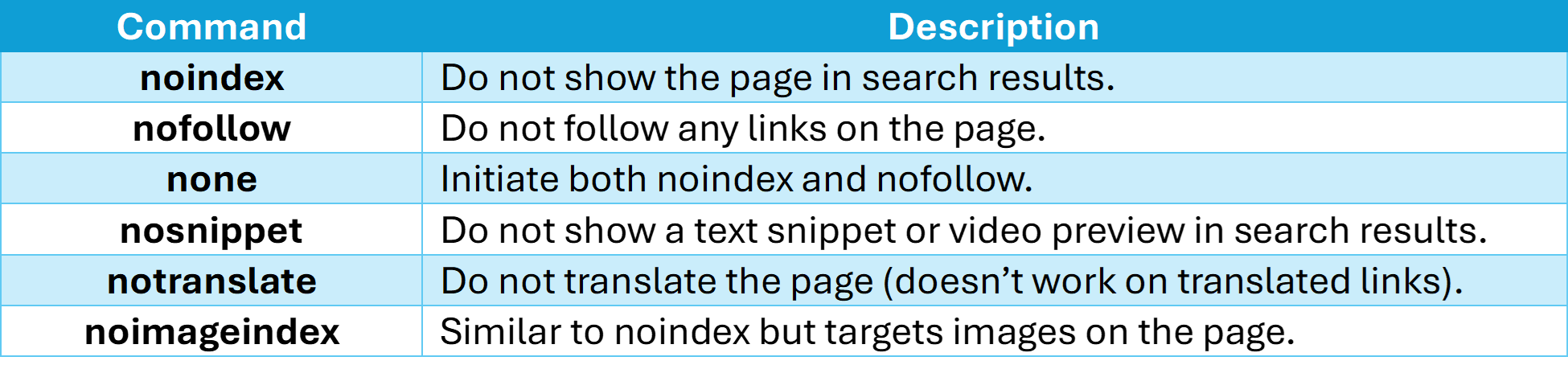
Although meta robots only work on a page-by-page basis, they strictly follow the command given. If you tell one to nofollow a page, it will do so even if other websites link to said page. Meta robots should be employed alongside robots.txt for the best effect, with one industry professional even suggesting using the former before the latter.
Take note that the standard meta robots tag only works on HTML pages. This means other types like PDF documents need a different tag for this task, namely the x-robots-tag.
Meta Viewport
The meta viewport tag is a key element of responsive web design. It instructs the browser to scale the page according to the size of the mobile device’s display. Without it, the browser will display the page on mobile as it would on a desktop PC—a user experience nightmare.
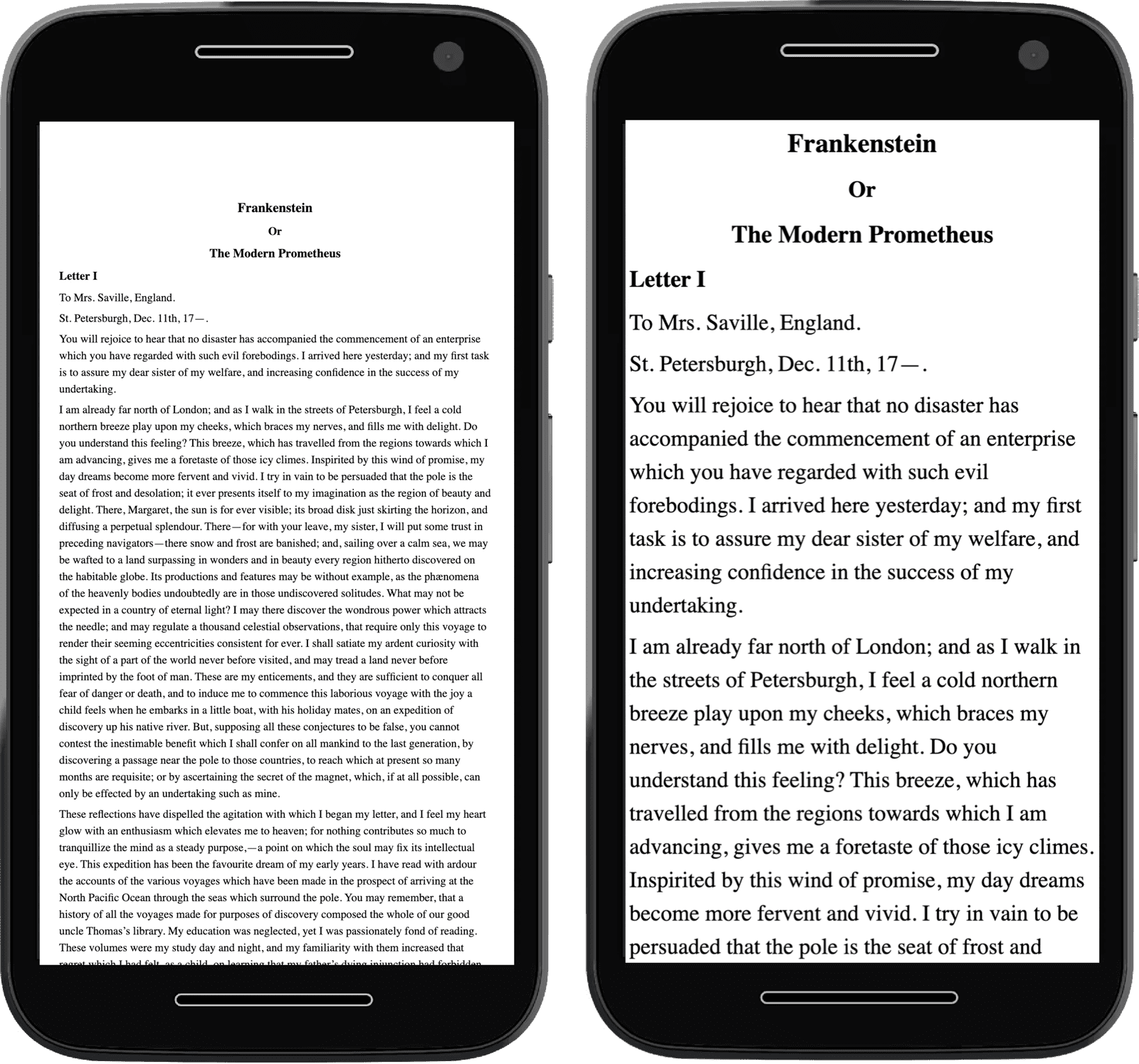
Two similar pages, one without the meta viewport (left) and the other with (right).
Source: Web.dev
Although not directly engaged with the search engine, the meta viewport tag is essential in SEO. Under Google’s mobile-first indexing, websites with user-friendly mobile versions are at an advantage over websites without. It also recommends responsive web design for its ease of execution and maintenance (compared to dynamic serving and separate URLs).
Take note that the tag does NOT adjust text size and image resolution. An image exceeding the display size when scaled for mobile introduces horizontal scrolling, which is a pain for users. All content must be contained within the display.
Meta Charset
This last type of metadata is an honorable mention. It doesn’t directly impact SEO, but it’s still necessary because visitors will be reading gibberish without it.
The meta charset sets the type of character set (charset) to use for encoding and decoding content. Without getting too technical, the web browser and the server talk in charset every time a user accesses a page. The encoding and decoding take less than a second, resulting in content that’s readable and reliable.
This is the part where I’d discuss the various charsets in use. However, there’s only one you really need, and that’s UTF-8. This charset is used by over 99% of websites and can support characters in languages other than English. Using other charsets risks bricking the entire encoding and decoding process, which can lead to the page becoming incomprehensible.
And when users can’t even read your content, they’ll bounce and keep looking elsewhere. That can’t be good for establishing search visibility, let alone building a good image.
Impacting SEO in the Shadows
Metadata likes to contribute to an SEO strategy hidden from plain sight. Their efforts may not be as outstanding as the likes of link building or content creation, but every bit helps. Never forget to put some metadata in every page.