
Google Search Central announced on March 11, 2026, that the branded queries filter in Search Console is now available to all eligible sites. The feature was first introduced in November 2025 as a limited rollout, and the expansion means most site owners can now use it to separate branded and non-branded search traffic directly inside the Performance report without building manual regex filters or maintaining keyword exclusion lists.
This is one of those updates that sounds simple on the surface but changes how SEO reporting works in practice. The ability to cleanly split branded from non-branded traffic has been a recurring pain point in Search Console for years, and Google just solved it natively.
What the Branded Queries Filter Actually Does
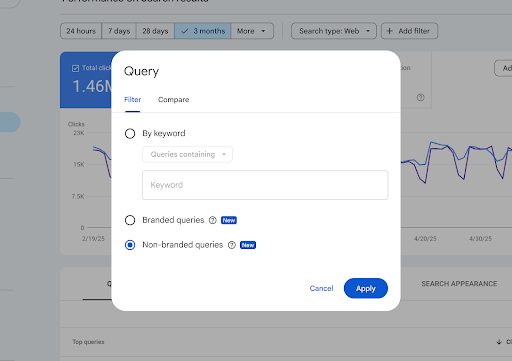
The filter lives inside the Search results Performance report in Search Console. When you click “Add filter” on the query dimension, two new options appear alongside the existing keyword filter: “Branded queries” and “Non-branded queries.”
Selecting “Branded queries” shows performance data only for queries that include the site’s brand name or closely associated products and services. Selecting “Non-branded queries” shows everything else. The filter works across all search types including web, image, video, and news, and surfaces the standard metrics: impressions, clicks, average position, and CTR.
The classification is not based on regex or manual keyword lists. Google uses an internal AI-assisted system that identifies branded queries by recognizing the site’s brand name in all languages, typos and misspellings of the brand name, and queries that don’t explicitly include the brand name but refer to a unique product or service of the site. So if a site is google.com, searches for “Gmail” would be classified as branded even though the word “Google” doesn’t appear in the query.
This is a meaningful distinction from how most SEOs have been doing branded filtering until now. The typical approach has been to build a regex pattern in the Performance report that includes known brand terms and variations, then filter by “queries not containing” to isolate non-branded traffic. That approach misses typos, foreign-language variations, and product-specific queries that don’t contain the brand name itself. Google’s AI classification catches those.
The Insights Report Card
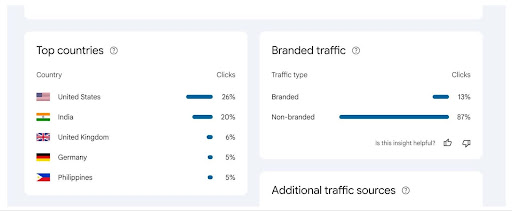
Alongside the filter in the Performance report, Google has added a new card to the Insights report that shows the breakdown of total clicks for branded versus non-branded traffic. This gives a quick visual comparison of how much traffic comes from people who already know the brand versus people discovering the site through non-branded searches.
The card shows two bars: branded clicks and non-branded clicks, each with a percentage of total. This high-level view is useful for tracking the ratio over time. A site with healthy organic growth should see the non-branded share increasing as content ranks for new queries, while the branded share reflects baseline demand from existing brand awareness.
For businesses running digital PR campaigns or brand awareness initiatives, this card provides a direct way to see whether increased media coverage is translating into more branded search volume. The connection between a PR push and a branded traffic spike becomes visible without stitching together data from multiple tools.
How Branded Classification Works Under the Hood
Google’s blog post is explicit about how the classification system operates, and a few details are worth highlighting because they affect how the data should be interpreted.
The system is AI-assisted, not rule-based. It doesn’t rely on a list of keywords that the site owner provides or a regex pattern that matches against query strings. Instead, it uses Google’s own understanding of the brand, its products, and its services to classify queries dynamically.
This means the classification includes queries in all languages. A search for the brand name in Japanese, misspelled in French, or abbreviated in German should all be classified as branded. It also means the system can recognize product-specific queries as branded even when the parent brand name isn’t present in the search.
Google acknowledges that “due to the dynamic and contextual nature of brand classification, some queries may occasionally be misidentified.” The filter is designed to make segmentation easier, not to be a perfect classifier. And importantly, the classification has no effect on how Google Search ranking works. It’s a reporting layer only.
One limitation flagged in LinkedIn discussions: there’s currently no way to customize what Google considers a branded query for a given site. An SEO strategist pointed this out across several properties, and Mueller responded directly: “At the moment, I’m not aware of plans to provide customization, but feedback in the tool is always welcome.” So for now, the classification is entirely Google’s call, and if a query is misclassified, the only recourse is submitting feedback through the tool.
Why This Changes SEO Reporting
Separating branded from non-branded traffic has always been one of the first things any competent SEO analysis requires, and until now it’s been surprisingly annoying to do properly in Search Console.
The manual regex approach works for simple brand names, but breaks down quickly for brands with common words in their name, brands with multiple product lines, brands that operate in multiple languages, or brands where misspellings and abbreviations are common. A brand called “Blue” would need an enormous exclusion list to avoid false positives. A brand with products that have their own search identity (like Google with Gmail, Maps, Chrome, etc.) would need those product names added manually to the branded regex, and those lists need maintenance as new products launch or old ones get discontinued.
Google’s AI classification handles all of that automatically. The filter should be more accurate out of the box than most manually constructed regex patterns, particularly for larger brands with diverse product portfolios.
For SEO reporting, this means a few things.
Non-branded traffic trends become cleaner. The primary question in most SEO programs is “how much traffic are we earning from people who weren’t already looking for us?” With a reliable branded/non-branded split, that question has a cleaner answer. Growth in non-branded traffic directly reflects the impact of content strategy, link-building, and technical improvements on discoverability.
Branded traffic becomes a brand health metric. Increases in branded search volume correlate with brand awareness, PR coverage, word-of-mouth, and advertising spend. Having this data natively in Search Console means it can be tracked alongside organic performance without pulling data from a separate tool or building a custom dashboard.
Client reporting gets simpler. For agencies and consultants, the most common reporting split is branded vs non-branded. Being able to pull this from Search Console directly, with Google’s own classification, removes the “your regex might be wrong” conversation and gives both sides a shared source of truth.
Campaign attribution improves. When a digital PR campaign or a guest posting placement generates media coverage, the branded traffic card in Insights gives a quick way to check whether that coverage is translating into increased brand search demand. The lag between a PR hit and a branded traffic lift is typically one to four weeks, and having the data in the same tool where organic performance is tracked makes the connection visible without manual data stitching.
Availability and Limitations
A few constraints are worth knowing before checking for the filter in your Search Console account.
The filter is available only for top-level properties. That means domain-level properties like example.com or URL-prefix properties like https://example.com. It’s not available for URL path properties (like https://example.com/path) or subdomain properties (like developers.google.com).
The filter requires sufficient query and impression volume. Sites with very low traffic may not see the option. Google hasn’t published a specific threshold, but the rollout is gradual and tied to signal availability.
The data is retroactive to some extent, but there are reports from SEOs noting that the branded vs non-branded breakdown only starts appearing from around the time the feature was first enabled for a given property, not from the full historical data range in Search Console.
The rollout is still gradual. Google’s blog post says it will continue rolling out “over the coming weeks,” so if the filter isn’t visible yet, it may simply not have reached the property yet.
How to Use It
The filter is accessed through the Search results Performance report in Search Console. Click “Add filter,” then select the Query dimension. The “Branded queries” and “Non-branded queries” options appear as radio buttons alongside the existing “By keyword” filter.
Select one, click Apply, and the Performance report updates to show data only for that query type. All standard metrics (clicks, impressions, CTR, average position) are available, and the data can be broken down by page, country, device, search appearance, and date range as usual.
The Insights report card showing the branded vs non-branded click breakdown appears automatically in the Insights section if the feature is available for the property.
For ongoing reporting, the most practical setup is checking the branded/non-branded ratio monthly and tracking the trend. A consistent increase in non-branded share generally signals that organic efforts are expanding the site’s reach beyond existing brand demand. A sudden spike in branded traffic can indicate successful PR, a viral moment, or increased advertising driving brand searches.
And for anyone who has been maintaining manual branded keyword regex filters in Search Console, this is a good time to test whether Google’s automated classification matches the manual results. If it does (and for most sites it should), the manual filter can be retired.